
How to handle Stripe renewal webhooks in C# and TypeScript with Subscrio
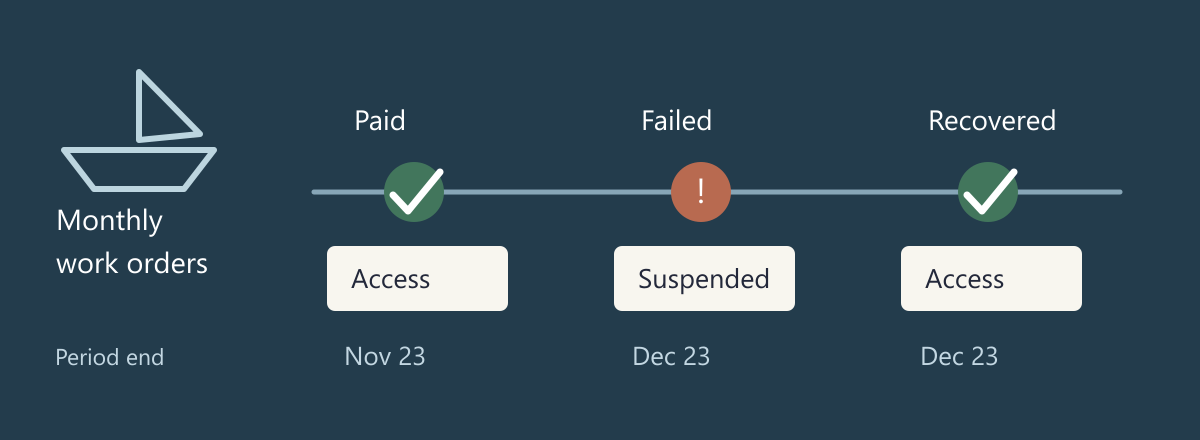
MooringDesk manages maintenance work for marinas. A customer has already paid for a monthly subscription and can create work orders. When Stripe renews that subscription, MooringDesk needs to keep the existing agreement current. If payment fails, the application also needs a clear answer about whether the customer can create more work.
In this guide we will link a recurring Stripe Price ID to a Subscrio billing cycle, connect the customer and their subscription, and process renewal webhooks in C# and TypeScript. We will read the updated subscription dates and check whether the customer can create work orders after payment succeeds, fails, or recovers.
We will also test Stripe renewals locally by forwarding sandbox webhooks through the Stripe CLI and observing the stored access decision.
Decide what a renewal changes
Stripe collects recurring payments. Subscrio stores the linked customer agreement and resolves its feature values. MooringDesk combines that entitlement with an explicit payment policy: new work orders are available only while the current Stripe subscription is active and its latest invoice is paid.
| Billing result | Stored agreement | New work orders |
|---|---|---|
| Successful renewal | Same agreement, updated period | Allowed |
| Latest invoice unpaid | Same agreement, current billing state | Suspended |
| Payment recovered | Same agreement, current billing state | Allowed |
| Subscription canceled | Same agreement, cancellation date | Denied |
This example has no grace period. A different policy needs different application logic. Forwarding a failed-payment event alone does not establish one.
Prepare your Stripe sandbox
Open your Stripe Dashboard and switch to a sandbox. Use that same sandbox for the catalog, API key, and Stripe CLI login throughout this walkthrough. The sample uses Stripe’s customer objects and a monthly subscription with one price.
In the product catalog, add a product named MooringDesk Marina. Give it a recurring price of $10 USD per month. Open the saved price and copy its Price ID. Stripe’s product and price instructions show the catalog setup.
Open the sandbox’s API keys page and copy its secret key for the demo server. The secret API key lets the server retrieve the current subscription from Stripe. The webhook signing secret, which we will obtain from the CLI later, verifies incoming deliveries. They are different values.
The code below uses price_mooring and cus_mooring to make the links easy to follow. The interactive demo reads your real sandbox Price ID from configuration and retrieves the customer ID from your test subscription. You will not need to replace identifiers inside the source files.
Initialize Subscrio
The runnable examples create a disposable database through their database helper. Use its connection string to initialize Subscrio, then install the catalog schema before creating the product. The C# helper creates SQL Server LocalDB on Windows; the TypeScript helper creates PostgreSQL. Imports and database cleanup are included in the full examples.
using var app = new Subscrio.Core.Subscrio(
    new SubscrioConfig
    {
        Database = new DatabaseConfig
        {
            DatabaseType = DatabaseType.SqlServer,
            ConnectionString = database.ConnectionString
        }
    }
);
await app.InstallSchemaAsync();
const app = new Subscrio({
  database: { connectionString: database.connectionString }
});
await app.installSchema();
Create the product
MooringDesk is the application whose work-order access Subscrio manages. Its plans and features will belong to this product.
await app.Products.CreateProductAsync(new("mooringdesk", "MooringDesk"));
await app.products.createProduct({
  key: 'mooringdesk',
  displayName: 'MooringDesk'
});
Define work-order access
A customer needs the work-orders feature to create maintenance work orders. Its toggle defaults to false, so a customer without a qualifying subscription does not receive this access.
await app.Features.CreateFeatureAsync(
    new("work-orders", "Create work orders", "toggle", "false")
);
await app.features.createFeature({
  key: 'work-orders',
  displayName: 'Create work orders',
  valueType: 'toggle',
  defaultValue: 'false'
});
Associate the feature with MooringDesk
Associate the feature with the product so Subscrio can resolve its value for MooringDesk customers. The most_generous rule allows access if a qualifying subscription supplies true.
await app.Products.AssociateFeatureAsync(
    "mooringdesk",
    "work-orders",
    new(SubscriptionRule: "most_generous")
);
await app.products.associateFeature('mooringdesk', 'work-orders', {
  subscriptionRule: 'most_generous'
});
Create the Marina plan
The Marina plan is the paid offer that includes work orders. Create it under the existing MooringDesk product.
await app.Plans.CreatePlanAsync(new("mooringdesk", "marina", "Marina"));
await app.plans.createPlan({
  key: 'marina',
  productKey: 'mooringdesk',
  displayName: 'Marina'
});
Include work orders in the plan
Set the plan value to true. Subscrio will resolve this value for the customer through their subscription to the plan.
await app.Plans.SetFeatureValueAsync("marina", "work-orders", "true");
await app.plans.setFeatureValue('marina', 'work-orders', 'true');
Link the Stripe Price ID to a billing cycle
Use the recurring Price ID you copied during sandbox setup. The snippets use price_mooring as a readable example; the interactive server reads your real ID from STRIPE_PRICE_ID.
Create a monthly billing cycle under the Marina plan and store that Price ID in ExternalProductId in C#, or externalProductId in TypeScript. Despite the field name, this Stripe integration expects a Price ID beginning with price_, not a Stripe Product ID beginning with prod_.
await app.BillingCycles.CreateBillingCycleAsync(
    new(
        "marina",
        "monthly",
        "Monthly",
        "months",
        DurationValue: 1,
        ExternalProductId: "price_mooring"
    )
);
await app.billingCycles.createBillingCycle({
  key: 'monthly',
  planKey: 'marina',
  displayName: 'Monthly',
  durationUnit: 'months',
  durationValue: 1,
  externalProductId: 'price_mooring'
});
The link is now price_mooring → the monthly billing cycle → the marina plan. When Subscrio processes a subscription event, it uses the Stripe subscription item’s Price ID to find the billing cycle and its plan. When it processes a successful invoice payment, it matches the invoice line’s price to that cycle and updates the linked subscription’s period dates.
The one-month duration describes the Subscrio billing cycle. Stripe runs the recurring charge; creating this record does not create a price or start charging a customer. Keep the interval consistent with the recurring price in Stripe. An annual offer would have its own billing cycle linked to its own annual Stripe Price ID.
Link the customer
Store the Stripe customer identifier on the Subscrio customer. Event processing uses this link to find the recipient of the subscription.
await app.Customers.CreateCustomerAsync(
    new("customer", "MooringDesk customer", ExternalBillingId: "cus_mooring")
);
await app.customers.createCustomer({
  key: 'customer',
  displayName: 'MooringDesk customer',
  externalBillingId: 'cus_mooring'
});
Link the existing subscription
This tutorial begins with a customer who already has a paid Stripe subscription. Create the corresponding Subscrio subscription once, referring to the customer and billing cycle created above. Store the Stripe subscription ID so later events can find and update this same record.
In the sample, C#’s Current() and TypeScript’s current return the recorded starting Stripe subscription: sub_mooring, belonging to cus_mooring, with a subscription item priced at price_mooring. The period dates below come from that item.
await app.Subscriptions.CreateSubscriptionAsync(
    new(
        "agreement",
        "customer",
        "monthly",
        ActivationDate: Current().Created,
        CurrentPeriodStart: Current().Items.Data[0].CurrentPeriodStart,
        CurrentPeriodEnd: Current().Items.Data[0].CurrentPeriodEnd,
        StripeSubscriptionId: Current().Id
    )
);
await app.subscriptions.createSubscription({
  key: 'agreement',
  customerKey: 'customer',
  billingCycleKey: 'monthly',
  stripeSubscriptionId: current.id,
  activationDate: new Date(current.created * 1000),
  currentPeriodStart: new Date(
    current.items.data[0]!.current_period_start * 1000
  ),
  currentPeriodEnd: new Date(current.items.data[0]!.current_period_end * 1000)
});
The three links serve different purposes:
| Stripe ID | Store it on |
|---|---|
| Price | Billing cycle: externalProductId |
| Customer | Customer: externalBillingId |
| Subscription | Subscription: stripeSubscriptionId |
These are the TypeScript field names; C# uses the corresponding PascalCase names shown above. For a new purchaser, follow the Stripe integration guide to start Checkout and process the initial subscription events. The setup here represents an already linked purchase. Do not run subscription creation again on each renewal.
Receive Stripe subscription renewal webhooks
The renewal worker listens for invoice.payment_succeeded, invoice.payment_failed, customer.subscription.updated, and customer.subscription.deleted events. The local forwarding setup later in this guide selects those four types. The complete sample exposes POST /stripe/webhook and passes the raw body and Stripe-Signature header to the worker below. Stripe’s subscription webhook guide describes the billing notifications.
Verify the raw webhook body
Read the body without parsing and reserializing it first. Stripe verifies the signature against those original bytes and the endpoint’s signing secret. The sample verifies the event before any receipt or Subscrio update is written. Stripe’s webhook documentation explains raw-body verification and delivery retries.
public async Task<string> ReceiveAsync(string rawBody, string signature)
{
    Event stripeEvent;
    try
    {
        stripeEvent = EventUtility.ConstructEvent(rawBody, signature, secret);
    }
    catch (StripeException error)
    {
        throw new WebhookSignatureException(error);
    }
    await gate.WaitAsync();
    try
    {
        return await ProcessAsync(stripeEvent);
    }
    finally
    {
        gate.Release();
    }
}
receive(rawBody: Buffer, signature: string): Promise<string> {
  const event = Stripe.webhooks.constructEvent(rawBody, signature, this.secret);
  const job = this.tail.then(() => this.process(event));
  this.tail = job.catch(() => undefined);
  return job;
}
The endpoint returns HTTP 400 for an invalid signature and HTTP 500 for a processing failure. Successfully processed events receive HTTP 200. A bad signature leaves the receipt table empty:
Invalid signature HTTP: 400
Receipts after invalid signature: 0
Reconcile the current subscription
Webhook delivery order is not a reliable ordering of billing changes. After verifying an event and checking the durable receipt table, the worker retrieves the current Stripe subscription with latest_invoice expanded. The default test supplies recorded responses through the same retrieval function.
public static Func<string, Task<Subscription>> StripeRetriever(
    StripeClient client
) =>
    id =>
        new SubscriptionService(client).GetAsync(
            id,
            new SubscriptionGetOptions { Expand = ["latest_invoice"] }
        );
export function stripeRetriever(stripe: Stripe) {
  return (id: string) =>
    stripe.subscriptions.retrieve(id, { expand: ['latest_invoice'] });
}
For invoice.payment_succeeded, the worker forwards the supported invoice event only when its price and period end match the current subscription item. It then passes the freshly retrieved subscription through Subscrio’s supported customer.subscription.updated path. The final reconciliation prevents an older event snapshot from moving the agreement back to an earlier period.
if (
    stripeEvent.Type == "invoice.payment_succeeded"
    && stripeEvent.Data.Object is Invoice paid
    && paid.Lines.Data.Any(l =>
        l.Pricing?.PriceDetails?.PriceId == item.Price.Id
        && l.Period.End == item.CurrentPeriodEnd
    )
)
    await app.Stripe.ProcessStripeEventAsync(stripeEvent);
await app.Stripe.ProcessStripeEventAsync(
    new Event
    {
        Id = stripeEvent.Id,
        Type = "customer.subscription.updated",
        Data = new EventData { Object = current }
    }
);
if (event.type === 'invoice.payment_succeeded') {
  const paid = event.data.object as Stripe.Invoice;
  if (
    paid.lines.data.some(
      l =>
        l.pricing?.price_details?.price === item.price.id &&
        l.period.end === item.current_period_end
    )
  )
    await this.app.stripe.processStripeEvent(event);
}
const reconciliation = {
  ...event,
  type: 'customer.subscription.updated',
  data: { object: current }
} as Stripe.Event;
await this.app.stripe.processStripeEvent(reconciliation);
The sample maps one known recurring price and customer. It rejects missing mappings before acknowledging the event, allowing a repair followed by a retry. A multi-plan application should resolve these mappings from its catalog rather than copying the sample identifiers.
Inspect the successful renewal
The starting subscription ends on October 23. After the paid renewal, read the same Subscrio record to see its new November 23 period end. These getters return the stored Subscrio subscription, including its current period dates:
var agreement = await app.Subscriptions.GetSubscriptionAsync("agreement");
const agreement = await app.subscriptions.getSubscription('agreement');
Both supported renewal paths update the same agreement. The C# runner prints the renewed UTC period end and checks that work orders remain available:
Successful renewal HTTP: 200
Successful renewal access: true
Successful renewal period end: "2026-11-23T16:10:51Z"
Successful renewal replay: "duplicate"
Subscription update HTTP: 200
Subscription update access: true
Subscription update period end: "2026-11-23T16:10:51Z"
Subscription update replay: "duplicate"
TypeScript asserts the same period instant and access decision. Its ISO formatting includes milliseconds. The agreement count remains one: a monthly renewal does not create a new local purchase record.
Update access after subscription payment failure
Subscrio’s core dispatcher does not handle invoice.payment_failed. MooringDesk handles it as a reason to retrieve current billing state, then persists its own work-order eligibility. The decision is explicit:
var allowed = current.Status == "active" && latestInvoice.Status == "paid";
const allowed = current.status === 'active' && invoice.status === 'paid';
Creating a work order requires both that stored payment decision and the Subscrio feature value. The worker methods below read the persisted payment decision before checking the entitlement.
public async Task<bool> CanCreateWorkOrderAsync()
{
    await using var db = new SqlConnection(connection);
    await db.OpenAsync();
    await using var cmd = db.CreateCommand();
    cmd.CommandText =
        "SELECT allowed FROM renewal_access WHERE subscription_id=@id";
    cmd.Parameters.AddWithValue("@id", subscriptionId);
    return await cmd.ExecuteScalarAsync() is true
        && await app.FeatureChecker.GetValueForCustomerAsync<bool>(
            "customer", "mooringdesk", "work-orders", false
        );
}
async canCreateWorkOrder() {
  const state = await this.db.query(
    'SELECT allowed FROM renewal_access WHERE subscription_id=$1',
    [this.subscriptionId]
  );
  return (
    state.rows[0]?.allowed === true &&
    (await this.app.featureChecker.getValueForCustomer(
      'customer',
      'mooringdesk',
      'work-orders',
      false
    ))
  );
}
The failure and recovery checks show the resulting decisions:
Failed renewal access: false
Failed renewal period end: "2026-12-23T16:10:51Z"
Payment recovery access: true
Payment recovery period end: "2026-12-23T16:10:51Z"
Cancellation access: false
Cancellation period end: "2026-12-23T16:10:51Z"
Payment recovery allows work again because the latest invoice is paid and the subscription is active. Cancellation denies work even when its final invoice remains paid. The agreement and its history remain stored.
Handle duplicate and delayed renewal webhooks
After the Subscrio update succeeds, the worker saves its payment decision and event receipt together in the application database. A repeated event ID returns duplicate. If processing fails before the receipt commits, the next delivery retrieves current Stripe state and tries again.
The sample processes events through one worker. Its README explains the coordination needed when running multiple workers.
The test creates a fresh worker over the same database, then delivers an old event snapshot with a new event ID after cancellation:
Linked agreement count: 1
Replay after worker restart: "duplicate"
Delayed event HTTP: 200
Delayed event preserves cancellation: false
The final false means work orders remain denied. The old delivery has not restored access. Separate tests return HTTP 500 for an unmapped price or customer, repair the fixture, and successfully retry the same event.
Install the sample dependencies
The MooringDesk sample includes two ways to test: a repeatable fixture runner and a server that stays running to receive actual sandbox webhooks. For the interactive walkthrough, install Node.js and the TypeScript dependencies first. The shared test-clock helper uses these dependencies even when you choose the C# server.
git clone https://github.com/subscrio/samples.git
cd samples/examples/stripe-subscription-renewals
npm --prefix typescript ci
For the TypeScript server, copy typescript/.env.example to typescript/.env and set DATABASE_URL to a PostgreSQL development connection with permission to create databases. The C# server uses SQL Server Express LocalDB with Windows integrated authentication.
Both implementations are in the public samples repository: C# with LocalDB and TypeScript with PostgreSQL.
Create a test subscription using your price
Use a PowerShell terminal in the sample folder for these commands. Set the sandbox secret key and the Price ID you copied from Stripe:
$env:STRIPE_SECRET_KEY = "sk_test_replace_with_your_sandbox_key"
$env:STRIPE_PRICE_ID = "price_replace_with_your_monthly_price"
node sandbox.cjs setup
The helper creates a named test clock, adds a fictional customer to it, attaches Stripe’s successful test payment method, and creates a paid monthly subscription using your price. It saves the identifiers in an ignored local file so subsequent commands operate on this same subscription. Your key is not written to that file.
Copy the printed subscription ID into the terminal environment:
$env:STRIPE_SUBSCRIPTION_ID = "sub_replace_with_the_printed_id"
In the Dashboard, open Billing’s subscription simulations and find MooringDesk renewal tutorial. Inspect the customer, monthly price, paid invoice, and subscription. The test clock lets us move through billing periods without waiting a month. Stripe documents the simulation lifecycle here.
Forward Stripe webhooks to localhost
Install the Stripe CLI, then open a second terminal and log in. Choose the same sandbox used for the test subscription:
stripe login
stripe listen --latest --forward-to http://127.0.0.1:4242/stripe/webhook --events invoice.payment_succeeded,invoice.payment_failed,customer.subscription.updated,customer.subscription.deleted
The --latest option requests the current event format expected by the sample SDK. An older sandbox default can cause the C# SDK to reject a delivery before processing it.
Leave this terminal running. This is the local webhook tunnel: Stripe CLI receives sandbox events and forwards them to your server. You do not register a localhost URL in the Dashboard. Copy the whsec_... signing secret printed by this listener. Stripe’s forwarding reference explains the command.
Back in the first terminal, set that secret:
$env:STRIPE_WEBHOOK_SECRET = "whsec_replace_with_the_listener_secret"
Use the listener’s secret here, rather than a signing secret from a separate Dashboard endpoint. The initial purchase happened before the tunnel started; the demo imports that existing subscription when it starts. Renewals will arrive through the tunnel.
Start the demo server
Run this from the sample folder in the first terminal:
npm --prefix typescript run listen
Run these commands from the C# project directory in a terminal containing the same four Stripe environment variables:
sqllocaldb start MSSQLLocalDB
dotnet restore --locked-mode
dotnet run --no-restore -- --listen
The server creates a disposable database and the catalog shown earlier. It maps your Price ID to the monthly billing cycle, retrieves your subscription from Stripe, and stores the customer and subscription links. It then keeps listening for webhook deliveries.
Open a third terminal in the sample folder, set STRIPE_SECRET_KEY there too, and read the starting state:
Invoke-RestMethod http://127.0.0.1:4242/status | ConvertTo-Json
This endpoint reads the Subscrio subscription and the application’s access decision. A representative response is below; your subscription ID and dates will differ:
{
  "subscriptionKey": "agreement",
  "stripeSubscriptionId": "sub_your_test_subscription",
  "currentPeriodEnd": "2026-10-23T17:31:35.000Z",
  "canCreateWorkOrder": true,
  "subscriptionCount": 1
}
Test a successful renewal through the tunnel
In the third terminal, advance the same test subscription to its next billing period:
node sandbox.cjs renew
The helper advances the clock past the renewal boundary, then allows time for invoice finalization and payment in the simulation. It prints Stripe’s current status, invoice status, and period end. This changes the actual sandbox subscription, so Stripe sends events for the same customer and price that Subscrio knows about.
Wait for the listener to show a forwarded HTTP 200 and the server to print Webhook: processed. Then request the local status again:
Invoke-RestMethod http://127.0.0.1:4242/status | ConvertTo-Json
The period end should move forward one month and match the helper’s Stripe output. Access remains true and the subscription count remains one. This checks the complete path: Stripe renewal, CLI forwarding, signature verification, Price ID matching, and the Subscrio update.
Test failed payment and recovery
Keep both the server and listener running. The next command attaches a failing test payment method and advances to another renewal:
node sandbox.cjs fail
Wait for the forwarded events, then read /status. Stripe should report past_due with an open invoice, and MooringDesk should report canCreateWorkOrder: false. The subscription count is still one.
Restore the successful test payment method and pay that open invoice:
node sandbox.cjs recover
After the webhook arrives, read /status again. Access should return to true. The period end stays the same because recovery pays for the period that already began.
Test cancellation and clean up
Cancel this test subscription immediately:
node sandbox.cjs cancel
After the forwarded cancellation event, /status should report false for work-order access and one stored subscription. This example tests immediate cancellation; it does not demonstrate scheduling cancellation for the end of a paid period.
Type stop and press Enter in the server terminal to close it and drop its disposable database. Stop the CLI listener with Ctrl+C. Then remove the Stripe simulation:
node sandbox.cjs cleanup
Cleanup deletes the tutorial’s clock, customer, and subscription. It leaves the catalog price you created intact. Running setup again creates a fresh test subscription for another run.
Diagnose a test that does not update access
| What you see | What to check |
|---|---|
| Nothing reaches the listener | CLI login, API key, price, and subscription must belong to the same sandbox. Keep the listener running while advancing the clock. |
| The CLI cannot connect to localhost | Start the server on port 4242 and use the exact webhook path in the forwarding command. |
| HTTP 400 | Use the listener’s signing secret and the documented --latest option, then restart the server. |
| HTTP 500 | Check the configured price and customer mapping, database availability, and the Stripe API response. The event has not been recorded as successfully processed. |
| HTTP 200 but no change | Wait for the payment event, then compare /status with the helper’s output. Unrelated subscription events are ignored by this single-subscription demo. |
A generic stripe trigger command may create different customers or prices. Use this subscription’s test clock to verify renewal matching. The repeatable fixture tests remain available through npm test in the TypeScript folder or dotnet run in the C# project; they cover duplicates and delayed deliveries without Stripe credentials.
Use the full renewal example to inspect the worker and tests. For an allowance that follows the updated subscription period, continue with billing-period usage metering.