
How to schedule subscription activation in TypeScript with Subscrio
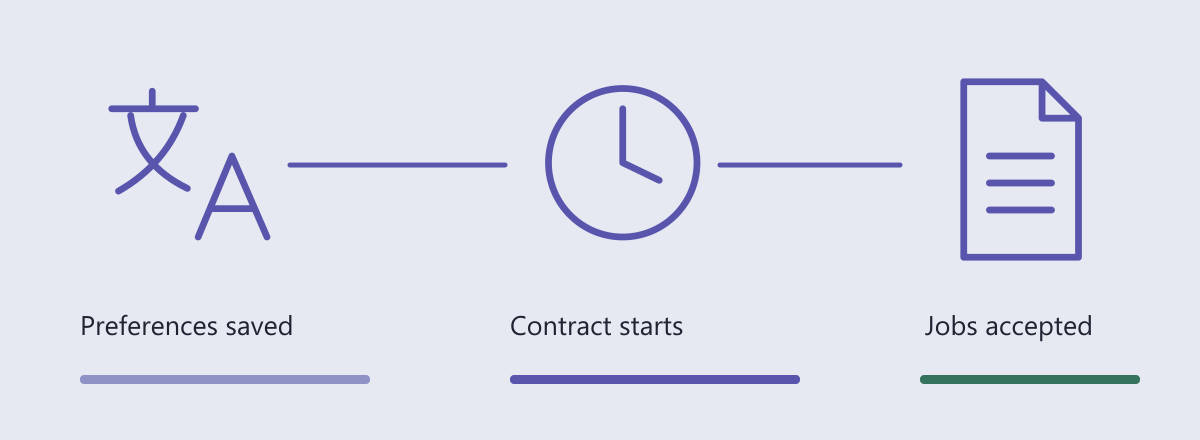
A translation agency signs a LinguaDesk contract that starts next month. Its coordinator wants to save terminology and delivery preferences today. Onboarding should work, while translation job submission waits for the contracted start.
In this guide we will schedule subscription activation in TypeScript and test the job action immediately before and at that instant. We will enter the signed contract directly in the sample.
The future subscription start date controls when paid feature access becomes available. It does not schedule a payment or require a job to flip an access flag at the start time.
Define the customer promise
The coordinator can prepare the agency before the contract starts. Only job submission depends on the subscription. We will test the last millisecond before activation and the exact activation instant, using a controlled clock instead of making the test wait.
Run the example
Get the complete runnable example. Install Node.js and PostgreSQL. The database role in DATABASE_URL must have permission to create databases.
git clone https://github.com/subscrio/samples.git
cd samples/examples/scheduled-subscription-activation-typescript
cp .env.example .env
# Set DATABASE_URL in .env to your local PostgreSQL connection.
npm ci
npm test
In PowerShell, Copy-Item .env.example .env also copies the configuration template. Each run creates and removes its own disposable PostgreSQL database.
The snippets below belong to that single program and run in order. check compares a returned value with the expected value, prints it, and fails the run if they differ. The displayed output was captured from the sample.
Initialize Subscrio
Create the client with the disposable database connection, then install its schema.
const clock: { at: Date | null } = { at: null };
const app = new Subscrio({
  database: { connectionString: db.connectionString },
  clock: { now: () => clock.at ?? new Date() }
});
await app.installSchema();
The clock lets the test move directly to a contract boundary. It controls the explicit feature-resolution and metering paths used here; it does not change the database server time.
Create the product
LinguaDesk has its own product catalog. The runner creates an isolated PostgreSQL database and removes only that generated database when it finishes.
await app.products.createProduct({
  key: 'linguadesk',
  displayName: 'LinguaDesk'
});
Define the features
The submit-jobs toggle controls whether the agency can send work for translation. Its false default keeps job submission closed until an eligible subscription supplies true.
await app.features.createFeature({
  key: 'submit-jobs',
  displayName: 'submit-jobs',
  valueType: 'toggle',
  defaultValue: 'false'
});
Associate the features
Associate submit-jobs with LinguaDesk and select most_generous for subscription resolution. For this toggle, an eligible subscription granting true enables access. Before activation, this subscription is ineligible and the false default applies.
await app.products.associateFeature('linguadesk', 'submit-jobs', {
  addonRule: 'additive',
  subscriptionRule: 'most_generous'
});
Create the plan
The Agency plan represents the contracted translation service. We will give it the job-submission feature before assigning the customer.
await app.plans.createPlan({
  key: 'agency',
  productKey: 'linguadesk',
  displayName: 'agency'
});
Set the plan values
The Agency plan enables submit-jobs. The feature value stays true; the activation date determines when this customer becomes eligible to receive it.
await app.plans.setFeatureValue('agency', 'submit-jobs', 'true');
Create the billing cycle
This monthly catalog record is the subscription option. Creating it does not initiate a charge.
await app.billingCycles.createBillingCycle({
  key: 'agency-monthly',
  planKey: 'agency',
  displayName: 'Monthly',
  durationUnit: 'months',
  durationValue: 1
});
Create the customer
Create the customer receiving this agreement.
await app.customers.createCustomer({
  key: 'customer',
  displayName: 'LinguaDesk demo customer'
});
Set the subscription activation date
Set activationDate to the contracted UTC start. The agreement subscription connects customer to agency-monthly, which belongs to the Agency plan. The onboarding object is a small test fixture representing saved preferences; Subscrio is only deciding when translation work becomes available.
const startsAt = '2030-05-01T09:00:00.000Z';
clock.at = new Date('2030-04-30T09:00:00.000Z');
await app.subscriptions.createSubscription({
  key: 'agreement',
  customerKey: 'customer',
  billingCycleKey: 'agency-monthly',
  activationDate: startsAt
});
const onboarding = { status: 'ready', preferencesSaved: true };
check('Before start: onboarding', onboarding.status, 'ready');
Captured output:
Before start: onboarding: "ready"
Check paid feature access before and at activation
Call the same action on both sides of the boundary. The queue must remain empty after the early request.
const jobs: string[] = [];
async function submitJob(customerKey: string) {
  if (
    !(await app.featureChecker.isEnabledForCustomer(
      customerKey,
      'linguadesk',
      'submit-jobs'
    ))
  )
    return 'subscription_not_started';
  jobs.push(customerKey);
  return 'accepted';
}
clock.at = new Date('2030-05-01T08:59:59.999Z');
check(
  'One millisecond before',
  await submitJob('customer'),
  'subscription_not_started'
);
assert.equal(jobs.length, 0);
clock.at = new Date(startsAt);
check('At activation', await submitJob('customer'), 'accepted');
assert.equal(jobs.length, 1);
Captured output:
One millisecond before: "subscription_not_started"
At activation: "accepted"
The injected clock drives explicit-rule feature resolution here. It does not advance the database server clock or every status view.
Read the result
The early request leaves the job array empty. At the contracted timestamp, the same action returns accepted and records exactly one job. Saving onboarding preferences is independent application behavior; the paid job check changes only when the agreement becomes eligible.
Keep onboarding available according to the application’s own policy and check the entitlement when accepting paid work. Activation is a timestamp, not a status field to flip in a scheduled job. The boundary test shows that the job action accepts work at the exact activation time.
The Subscrio subscription feature-gating guide explains the related model.
Run the complete TypeScript example to reproduce the entitlement decisions and their expected results.