
How to add feature entitlements to ASP.NET Core with Subscrio
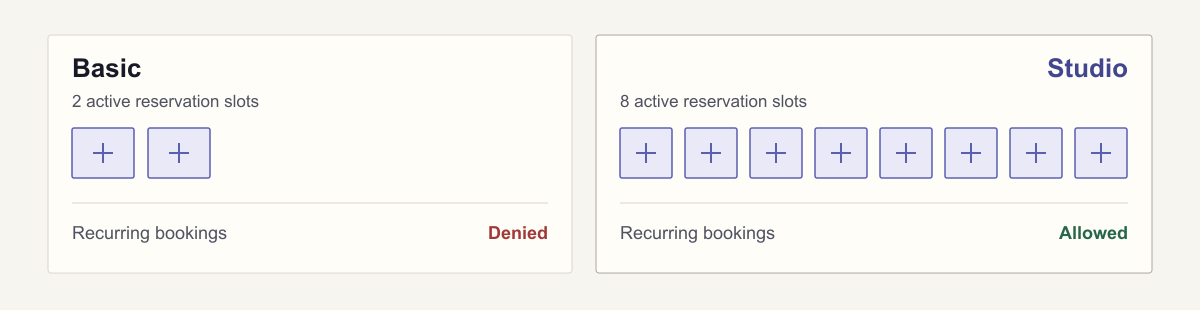
Suppose you’ve built KilnBook, a booking app for pottery studios. Staff use it to reserve kiln time for classes and production work. A studio that runs the same class each week also wants to repeat a reservation instead of entering it again every Tuesday.
You decide to offer two paid plans. Basic covers occasional bookings. Studio allows more active reservations and adds recurring bookings for customers with a regular schedule. Both plans use the same booking application, but the customer’s purchase determines which options are available and how much they can book.
Now those plan rules need to become part of the booking workflow. Before accepting a reservation, the application must check whether the customer has the requested capability and enough remaining capacity for another booking. These capabilities and allowances are the customer’s feature entitlements.
In this guide we will add feature entitlements to an ASP.NET Core app using Subscrio. Subscrio will store the plan values and resolve what each customer receives. The endpoint that creates reservations will use those answers to accept or reject a booking.
This is plan-based feature gating: the customer subscription supplies the capabilities and limits that the ASP.NET Core endpoint enforces.
Define what each plan includes
For this example, we’ll give the plans small allowances so their limits are easy to test:
| Entitlement | Basic | Studio |
|---|---|---|
| Active reservations | 2 | 8 |
| Recurring bookings | Disabled | Enabled |
The reservation limit is a numeric feature. Subscrio supplies the customer’s allowance; the booking application tracks the reservations that count toward it.
Run the example first
The complete C# example uses SQL Server LocalDB. Its verification command starts the API, sends real HTTP requests, checks the database, and exits. It includes the failure cases below, so you can change a rule and see what breaks.
You need Windows, the .NET SDK, and SQL Server Express LocalDB. LocalDB uses your Windows identity, so this example needs no database password. If you do not have it installed, add the SQL Server Express LocalDB component through the SQL Server Express installer or Visual Studio Installer.
Clone the samples repository and open this example:
git clone https://github.com/subscrio/samples.git
cd samples/examples/feature-entitlements-aspnet-core
sqllocaldb start MSSQLLocalDB
dotnet restore --locked-mode --source https://api.nuget.org/v3/index.json
dotnet run --no-restore -- --verify
If the LocalDB instance is missing, run sqllocaldb create MSSQLLocalDB before starting it.
The verification run creates a temporary database with a generated name, exercises the endpoint, and removes that database afterward. Several lines from a passing run are:
PASS Basic recurring booking denied: 403
PASS Basic first reservation: 201
PASS Studio recurring booking allowed: 201
PASS Studio ninth reservation denied: 409
All HTTP and database checks passed.
To keep the server running for manual requests:
$env:DOTNET_ENVIRONMENT = 'Development'
dotnet run --no-restore
This uses a persistent KilnBookEntitlements LocalDB database and listens on http://127.0.0.1:5078.
Connect Subscrio to LocalDB
The application constructs a connection string in this form:
Server=(localdb)\MSSQLLocalDB;Database=KilnBookEntitlements;Integrated Security=true;TrustServerCertificate=true
Program.cs selects the SQL Server provider and registers Subscrio with dependency injection:
var config = new SubscrioConfig
{
    Database = new DatabaseConfig
    {
        ConnectionString = connectionString,
        DatabaseType = DatabaseType.SqlServer
    }
};
builder.Services.AddSubscrio(config);
The sample uses Subscrio.Core.Config, Subscrio.Core.DependencyInjection, and Subscrio.Core.Domain.ValueObjects. The registration gives each request its own Subscrio instance. Startup creates the sample database, installs the Subscrio schema if needed, and seeds the catalog.
Subscrio’s tables live in the subscrio schema. KilnBook keeps its customer booking records and reservations in a separate kilnbook schema. The application owns those booking records.
Create the product
KilnBook is the product whose features and plans we’ll manage in Subscrio. Create it first so we can attach the booking features and plans to it:
await subscrio.Products.CreateProductAsync(
    new CreateProductDto("kilnbook", "KilnBook")
);
The setup examples below use the records and values from Catalog.cs, with DTOs from Subscrio.Core.Application.DTOs. They show each operation separately; the runnable sample also checks for existing records so restarting it does not repeat their creation.
Define the features
The plan comparison above gives KilnBook two rules to enforce: whether a customer can create recurring bookings, and how many active reservations that customer can hold. We’ll represent each rule as a feature in Subscrio, then give Basic and Studio their own values for those features.
For recurring bookings, the answer is yes or no. Subscrio calls this a toggle feature: true means the capability is enabled, and false means it is disabled. The reservation allowance is a numeric feature because its value is a number, such as Basic’s two reservations or Studio’s eight.
Each feature also needs a default value, which Subscrio uses when no applicable subscription or override supplies one. We’ll set recurring bookings to false and the reservation allowance to 0. A customer who has not bought a plan therefore cannot make a booking. The plan values we assign next give paying customers their access.
Create a feature definition for each booking rule:
await subscrio.Features.CreateFeatureAsync(
    new CreateFeatureDto(
        Key: "recurring-bookings",
        DisplayName: "Recurring bookings",
        ValueType: "toggle",
        DefaultValue: "false"
    )
);

await subscrio.Features.CreateFeatureAsync(
    new CreateFeatureDto(
        Key: "active-reservations",
        DisplayName: "Active reservations",
        ValueType: "numeric",
        DefaultValue: "0"
    )
);
Associate the features with KilnBook
The feature definitions describe the two rules. Associate them with the kilnbook product so its plans can assign values to them:
await subscrio.Products.AssociateFeatureAsync("kilnbook", "recurring-bookings");
await subscrio.Products.AssociateFeatureAsync("kilnbook", "active-reservations");
Create the plans
Basic and Studio are the two paid offerings for KilnBook. Create both under the product we defined earlier:
await subscrio.Plans.CreatePlanAsync(
    new CreatePlanDto("kilnbook", "kilnbook-basic", "Basic")
);
await subscrio.Plans.CreatePlanAsync(
    new CreatePlanDto("kilnbook", "kilnbook-studio", "Studio")
);
Assign the feature entitlements for each plan
Now give each plan the values from the comparison table. Basic allows two active reservations and disables recurring bookings. Studio allows eight and enables recurring bookings:
await subscrio.Plans.SetFeatureValueAsync(
    "kilnbook-basic",
    "active-reservations",
    "2"
);
await subscrio.Plans.SetFeatureValueAsync(
    "kilnbook-basic",
    "recurring-bookings",
    "false"
);

await subscrio.Plans.SetFeatureValueAsync(
    "kilnbook-studio",
    "active-reservations",
    "8"
);
await subscrio.Plans.SetFeatureValueAsync(
    "kilnbook-studio",
    "recurring-bookings",
    "true"
);
These plan values replace the defaults for customers with an applicable subscription. Subscrio stores feature values as strings, which is why the numbers and booleans appear in quotes. Later, the booking endpoint will read the allowance as an integer and check recurring access as a boolean.
Create the billing cycles
KilnBook offers both plans on a monthly cycle. In Subscrio, a billing cycle belongs to a plan, and a customer subscription selects that cycle. Create the monthly option for each plan as part of the product catalog, before assigning any customers:
await subscrio.BillingCycles.CreateBillingCycleAsync(
    new CreateBillingCycleDto(
        PlanKey: "kilnbook-basic",
        Key: "kilnbook-basic-monthly",
        DisplayName: "Basic monthly",
        DurationUnit: "months",
        DurationValue: 1
    )
);

await subscrio.BillingCycles.CreateBillingCycleAsync(
    new CreateBillingCycleDto(
        PlanKey: "kilnbook-studio",
        Key: "kilnbook-studio-monthly",
        DisplayName: "Studio monthly",
        DurationUnit: "months",
        DurationValue: 1
    )
);
These cycles can be reused by customers choosing the corresponding plans. Creating them does not collect a payment.
Create the customers
Clay Room and River Studio are the two pottery businesses we’ll use to test the plans. Create a customer record for each so Subscrio can resolve their entitlements independently:
await subscrio.Customers.CreateCustomerAsync(new CreateCustomerDto("clay-room"));
await subscrio.Customers.CreateCustomerAsync(new CreateCustomerDto("river-studio"));
A customer record identifies the business receiving access. It does not assign a plan; we’ll do that through a subscription next. The full sample also creates visitor without a subscription to test a customer who has no plan.
Give each customer a subscription
Clay Room has chosen Basic, and River Studio has chosen Studio. Create a subscription for each customer using the monthly billing cycles we already defined:
await subscrio.Subscriptions.CreateSubscriptionAsync(
    new CreateSubscriptionDto(
        Key: "clay-room-agreement",
        CustomerKey: "clay-room",
        BillingCycleKey: "kilnbook-basic-monthly"
    )
);

await subscrio.Subscriptions.CreateSubscriptionAsync(
    new CreateSubscriptionDto(
        Key: "river-studio-agreement",
        CustomerKey: "river-studio",
        BillingCycleKey: "kilnbook-studio-monthly"
    )
);
The subscription now connects river-studio to kilnbook-studio-monthly, which belongs to kilnbook-studio. When the booking endpoint checks this customer’s entitlements, Subscrio can use the Studio plan’s values: recurring bookings enabled and eight active reservations allowed.
Clay Room’s subscription connects it to Basic in the same way, giving it two active reservations with recurring bookings disabled.
Here we assign the subscription directly to demonstrate entitlement setup. This does not collect a payment; in your application, create the subscription when the customer’s purchase or agreement is confirmed.
Check plan-based access in the booking endpoint
Suppose a studio wants a recurring reservation for its weekly pottery class. The application must decide whether that customer’s plan includes recurring bookings and whether the customer has room for another active reservation. A Studio customer with capacity remaining should be able to book; a Basic customer should be denied the recurring booking because their plan does not include it.
The endpoint makes those decisions by asking Subscrio for the customer’s recurring-booking entitlement and reservation allowance. It then passes the allowance to the booking logic, which checks how many reservations the customer already holds.
The application supplies the customer’s identity. The code below uses that customer’s entitlements to decide whether to accept the reservation. Here is the complete endpoint from Program.cs:
app.MapPost(
        "/reservations",
        async (
            CreateReservation request,
            ClaimsPrincipal user,
            SubscrioInstance subscrio,
            ReservationStore reservations
        ) =>
        {
            var customerKey = user.FindFirstValue("customer_key")!;
            if (
                request.Recurring
                && !await subscrio.FeatureChecker.IsEnabledForCustomerAsync(
                    customerKey,
                    "kilnbook",
                    "recurring-bookings"
                )
            )
                return Results.Json(
                    new { error = "recurring_bookings_not_included" },
                    statusCode: 403
                );

            var limit = await subscrio.FeatureChecker.GetValueForCustomerAsync<int>(
                customerKey,
                "kilnbook",
                "active-reservations",
                0
            );
            if (limit <= 0)
                return Results.Json(
                    new { error = "no_reservation_allowance" },
                    statusCode: 403
                );

            var reservation = await reservations.TryCreateAsync(
                customerKey,
                request.Recurring,
                limit
            );
            return reservation is null
                ? Results.Json(
                    new { error = "reservation_limit_reached", limit },
                    statusCode: 409
                )
                : Results.Json(reservation, statusCode: 201);
        }
    )
    .RequireAuthorization("CreateReservations");
SubscrioInstance is an alias for Subscrio.Core.Subscrio. Notice that the endpoint never asks whether the plan is named Basic or Studio. It asks for the capability and allowance it needs. Another plan could grant the same features without adding a branch here.
With the catalog and subscriptions above, the two Subscrio checks have these expected return values for each customer. IsEnabledForCustomerAsync returns a boolean for recurring-bookings; GetValueForCustomerAsync<int> returns an integer for active-reservations:
| Customer | Recurring enabled | Reservation allowance |
|---|---|---|
| Clay Room (Basic) | false | 2 |
| River Studio (Studio) | true | 8 |
| Visitor (no subscription) | false | 0 |
For River Studio, 8 is the total allowance supplied by the plan, not the number of spaces still available. It remains 8 even if the customer already has three reservations. The booking application uses that allowance alongside its existing reservations to decide whether another booking fits. For Visitor, the defaults give no recurring access and no reservation allowance.
The product key, kilnbook, keeps the check scoped to this application. The customer key identifies the customer receiving access. This example deliberately keeps one subscription per customer; more complex combinations deserve their own explicit resolution rules.
Try the same booking under both plans
River Studio wants to reserve kiln time for its weekly class. Its Studio plan includes recurring bookings, so the application should accept the reservation if the customer has capacity remaining. With the sample running, try that booking using this complete request from another PowerShell window:
Invoke-RestMethod -Method Post -Uri http://127.0.0.1:5078/reservations `
  -Headers @{ Authorization = 'Bearer studio-owner' } `
  -ContentType application/json -Body '{"recurring":true}'
The sample provides studio-owner and basic-owner as development-only test identities for the two customers. The Studio request returns a new reservation with status 201 when capacity remains. To try the same booking for Clay Room, change studio-owner to basic-owner. Clay Room’s Basic plan does not include recurring bookings, so the application returns 403 with:
{
  "error": "recurring_bookings_not_included"
}
The booking intent is the same in both cases. The customer’s entitlement determines whether the application accepts it.
The self-check verifies the entitlement outcomes:
| Request | Result |
|---|---|
| Customer without a subscription | 403 |
| Basic recurring booking | 403 |
| Studio recurring booking with capacity remaining | 201 |
| Reservation beyond the plan allowance | 409 |
Adapt the example to your app
When you adapt it, start with one capability you want to include in a paid plan. Define the feature and its default, associate it with your product, and assign the plan’s value. Create the customer’s subscription, then use Subscrio’s feature checker where the application needs to decide whether that customer can use the capability. For a numeric allowance, use the typed getter to retrieve the value your application needs to enforce.
Run the complete LocalDB example, then change one plan value and rerun its checks. The feature entitlements guide explains the catalog model, and the .NET library guide covers the library’s place in your application.