
Enhancing ABP Feature Entitlements with Subscrio: Plans, Limits, and Overrides
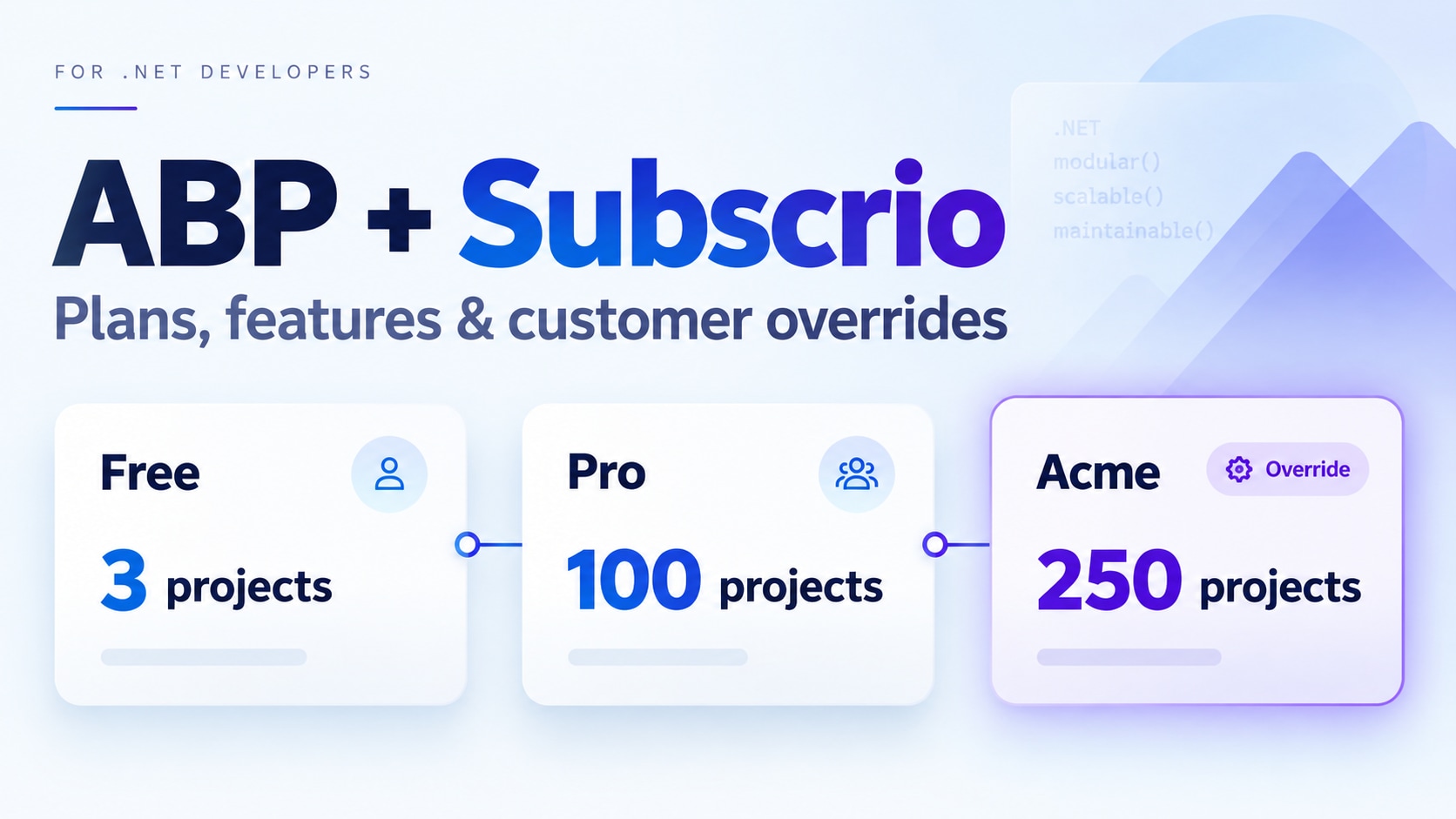
Subscrio is a free, open-source entitlement engine for .NET and TypeScript that connects what customers buy to the features and limits they receive. It runs inside your application and resolves those feature entitlements from plans and customer-specific overrides in your own database, supporting recurring subscriptions, one-time purchases, and lifetime access.
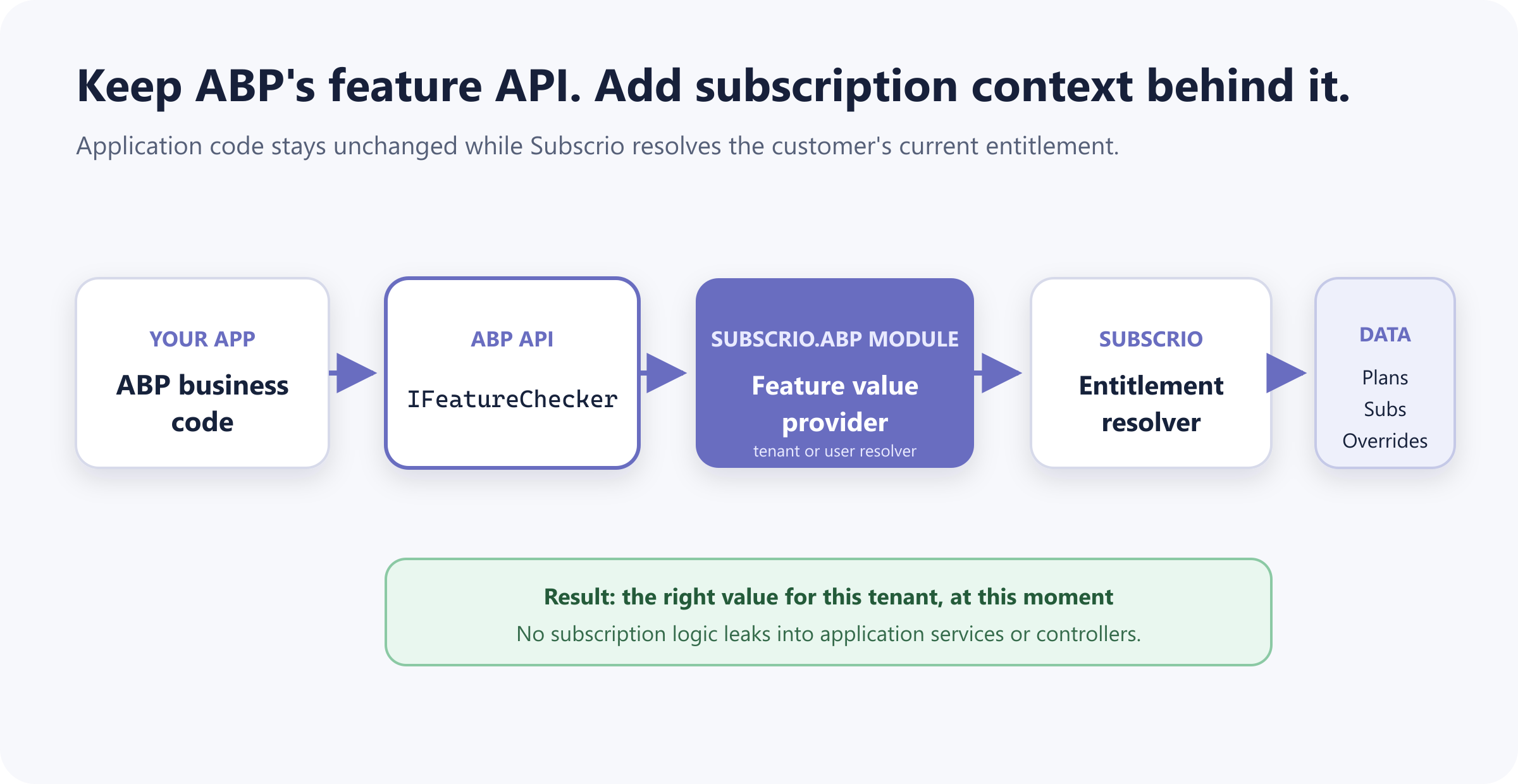
If you’re building with ABP Framework, you already have a useful place to read those values: its feature system. A call to IFeatureChecker can tell you whether reports are enabled or how many projects a customer is allowed to create.
We’ll add plan-based feature access through the reusable Subscrio.Abp module, then work through its console sample. We’ll define a Pro plan with a 100-project limit, give Acme Manufacturing an override for 250, and watch ABP return the right values through IFeatureChecker.
Why add Subscrio to ABP?
ABP’s open-source Feature System handles feature definitions, defaults, and value resolution. Feature Management adds tenant-specific values. Products, plans, purchases, and billing are outside that feature system, so you need something to connect a customer’s access to the values your application reads.
ABP Commercial covers some of that ground. Its SaaS module assigns an edition to a tenant, with feature values and tenant overrides. Its Payment module supports one-time payments, Stripe recurring payments, and payment plans linked to gateway prices. Both modules require an ABP Team license or higher. The built-in entitlement model is still one edition per tenant; fulfilling a one-time purchase requires application code.
Subscrio is useful when you need access to follow your product model more closely: several plan assignments for one customer, access sold to individual users, or an exception attached to a particular assignment. It stores products, plans, feature values, and billing cycles together, and includes helpers for Stripe Checkout and event synchronization. You can use it with open-source ABP without adding the commercial SaaS or Payment modules.
You can also decide what access a customer keeps after a plan expires. ABP Commercial supports edition expiration separately from tenant activation. Subscrio lets you configure a replacement plan, such as moving a customer to a free package, while your application controls whether they can still sign in.
Getting the catalog into place is straightforward, too. Subscrio can synchronize products, features, plans, billing cycles, and plan values from a JSON file you keep in source control. If your team wants a ready-made management interface, the optional commercial Subscrio Server application adds a web UI and REST API. The Core library and ABP adapter remain free and MIT-licensed; you don’t need Server to use them.
| Built-in capability | ABP | ABP Commercial | Subscrio |
|---|---|---|---|
| Boolean, numeric, and text feature values | ✅ | ✅ | ✅ |
| Feature values specific to a tenant | ✅ | ✅ | ✅ |
| Reusable feature packages, such as editions or plans | ❌ | ✅ | ✅ |
| Commercial management UI for plans and customer access | ❌ | ✅ | ✅ |
| Stripe recurring Checkout and event synchronization | ❌ | ✅ | ✅ |
| Expiring edition or plan assignments | ❌ | ✅ | ✅ |
| JSON catalog configuration and synchronization | ❌ | ❌ | ✅ |
| Multiple concurrent plan assignments per customer | ❌ | ❌ | ✅ |
| Billing-cycle definitions independent of payment gateway prices | ❌ | ❌ | ✅ |
| Temporary and permanent overrides on a plan assignment | ❌ | ❌ | ✅ |
| Configured replacement plan after expiration | ❌ | ❌ | ✅ |
| Built-in user-level entitlement resolution | ❌ | ❌ | ✅ |
| Combine plan, add-on, and override entitlements | ❌ | ❌ | ✅ |
| Usage metering with limits and period resets | ❌ | ❌ | ✅ |
| Prepaid credits, grants, and consumption tracking | ❌ | ❌ | ✅ |
| Feature overrides that expire on a specific date | ❌ | ❌ | ✅ |
What we’re building
Imagine you’re building a project management application with two plans. Free customers can create up to three projects, while Pro customers get reports and a limit of 100 projects.
One customer, Acme Manufacturing, has negotiated an allowance of 250 projects. They still use Pro, so we want to record that exception without changing the plan for everyone else. Here’s what the sample will model:
| Feature | ABP default | Free plan | Pro plan | Acme Manufacturing |
|---|---|---|---|---|
| Reports | false | false | true | true |
| Maximum projects | 3 | 3 | 100 | 250 |
The sample repository implements this scenario in Subscrio.Abp.Sample, using the reusable Subscrio.Abp module.
Reports will show us a value inherited from the plan. Maximum projects will show us an override winning over the plan. We’ll print the defaults, plan values, and customer values separately, then check that ABP returns the same result.
The sample assigns a monthly billing cycle directly, so you can run the whole example without a payment provider. We’ll come back to Stripe once the feature integration is working.
What the Subscrio ABP module takes care of
There are two jobs we shouldn’t have to repeat in every ABP application: connecting feature checks to Subscrio, and copying feature definitions into its catalog. Subscrio.Abp handles both.
At runtime, SubscrioFeatureValueProvider connects ABP’s IFeatureChecker to Subscrio. It uses a customer key resolver to identify the current tenant or user, then asks Subscrio for that customer’s feature value. During catalog setup, AbpSubscrioFeatureCatalog converts the selected ABP definitions into Subscrio feature configuration, including their types and defaults.
Your application supplies the parts that depend on your business: which features belong to the product, what each plan includes, and which customers have which assignments.
To add the integration to an existing application:
dotnet add package Subscrio.Abp
The package targets .NET 8, .NET 9, and .NET 10. Subscrio.Abp and Subscrio.Core share a package version. The console sample references the module project directly and targets .NET 10.
Start with two ABP features
Those plan differences give us two features to define: whether a customer can use reports and how many projects they’re allowed. We’ll represent report access as a toggle and the project limit as a number, starting with ordinary ABP definitions in AppFeatures.cs:
public static class AppFeatures
{
    public const string Reports = "acme-reports";
    public const string MaxProjects = "acme-max-projects";

    public static readonly string[] All = [Reports, MaxProjects];
}

public sealed class AcmeFeatureDefinitionProvider : FeatureDefinitionProvider
{
    public override void Define(IFeatureDefinitionContext context)
    {
        var group = context.AddGroup(
            "Acme",
            new FixedLocalizableString("Acme"));

        group.AddFeature(
            AppFeatures.Reports,
            defaultValue: "false",
            displayName: new FixedLocalizableString("Reports"),
            valueType: new ToggleStringValueType());

        group.AddFeature(
            AppFeatures.MaxProjects,
            defaultValue: "3",
            displayName: new FixedLocalizableString("Maximum projects"),
            valueType: new FreeTextStringValueType(new NumericValueValidator(0, 10000)));
    }
}
These defaults describe the starting values: reports are off and the project limit is three. We haven’t assigned anyone to a plan yet. Keeping the definitions here also means the rest of the ABP application can continue using the same feature names and types.
Tell the module which features and customer to use
The sample treats an ABP tenant as a Subscrio customer. Its module therefore depends on SubscrioAbpTenantModule, alongside Autofac:
[DependsOn(
    typeof(AbpAutofacModule),
    typeof(SubscrioAbpTenantModule)
)]
public sealed class AbpSubscrioSampleModule : AbpModule
That dependency brings in SubscrioAbpModule, which registers the feature value provider and catalog helper. You don’t need to register either yourself.
Before configuring the connection, the sample gives the product and customer mapping stable identifiers. These constants and the helper also live in AppFeatures.cs:
public static class AppProducts
{
    public const string Acme = "acme";
}

public static class AppTenants
{
    public static string GetCustomerKey(Guid tenantId) => $"tenant-{tenantId:N}";
}
The customer key comes from the tenant’s ID, so renaming Acme Manufacturing won’t change its identity in Subscrio. The same helper will be used when we create the customer.
Inside ConfigureServices, AbpSubscrioSampleModule.cs registers Subscrio.Core, the .NET entitlement library, with the sample’s SQL Server LocalDB connection:
context.Services.AddSubscrio(
    new SubscrioConfig
    {
        Database = new DatabaseConfig
        {
            ConnectionString = LocalDbDatabase.ConnectionString,
            DatabaseType = DatabaseType.SqlServer,
            Ssl = false
        }
    },
    ServiceLifetime.Scoped);
Then it selects our two features and associates them with the Acme product:
Configure<SubscrioAbpOptions>(options =>
{
    options.ProductKey = AppProducts.Acme;
    options.FeatureGroupName = "Acme";
    options.IsManagedFeature = feature =>
        AppFeatures.All.Contains(feature.Name, StringComparer.Ordinal);
    options.FeatureDisplayNameFactory = feature => feature.Name switch
    {
        AppFeatures.Reports => "Reports",
        AppFeatures.MaxProjects => "Maximum projects",
        _ => feature.Name
    };
});

Configure<SubscrioAbpTenantOptions>(options =>
{
    options.CustomerKeyFactory = AppTenants.GetCustomerKey;
});
IsManagedFeature defaults to selecting nothing. This lets you introduce Subscrio for specific features without changing how unrelated ABP features resolve. FeatureGroupName and FeatureDisplayNameFactory control the metadata exported to the Subscrio catalog.
For an application that sells access to individual users, choose SubscrioAbpUserModule instead. It reads ICurrentUser.Id, with a default customer key of user-{userId:N}. You can customize that format through SubscrioAbpUserOptions.CustomerKeyFactory, just as the tenant sample does above.
Choose exactly one strategy. The provider rejects missing or multiple ISubscrioCustomerKeyResolver registrations. If you need a different mapping, depend on the base SubscrioAbpModule and register your own implementation of that interface. A missing tenant or anonymous user produces no customer key, allowing ABP’s other providers to continue.
Give the features a home in Free and Pro
Now we can define what each plan includes. This happens in AcmeCatalogSynchronizer.SyncAsync, using the plan keys declared in AppFeatures.cs:
public static class AppPlans
{
    public const string Free = "free";
    public const string Pro = "pro";
}
The synchronizer first calls the module’s AbpSubscrioFeatureCatalog.GetFeaturesAsync(). That reads our ABP definitions and produces Subscrio feature configuration: reports becomes a toggle, maximum projects becomes numeric, and both keep their ABP defaults. Other nonnumeric value types map to text; a missing value type maps to toggle.
The application then adds the product, plan values, and monthly billing cycles:
var features = await _featureCatalog.GetFeaturesAsync();

var config = new ConfigSyncDto(
    Version: DemoCatalog.Version,
    Features: features.ToList(),
    Products:
    [
        new ProductConfig(
            Key: AppProducts.Acme,
            DisplayName: "Acme",
            Description: "The demo product used by the ABP and Subscrio integration sample.",
            Features: features.Select(feature => feature.Key).ToList(),
            Plans:
            [
                new PlanConfig(
                    Key: AppPlans.Free,
                    DisplayName: "Free",
                    Description: "The default Acme plan.",
                    FeatureValues: new Dictionary<string, string>
                    {
                        [AppFeatures.Reports] = "false",
                        [AppFeatures.MaxProjects] = "3"
                    },
                    BillingCycles:
                    [
                        new BillingCycleConfig(
                            Key: DemoCatalog.FreeBillingCycleKey,
                            DisplayName: "Free monthly",
                            DurationValue: 1,
                            DurationUnit: "months")
                    ]),
                new PlanConfig(
                    Key: AppPlans.Pro,
                    DisplayName: "Pro",
                    Description: "The paid Acme plan.",
                    FeatureValues: new Dictionary<string, string>
                    {
                        [AppFeatures.Reports] = "true",
                        [AppFeatures.MaxProjects] = "100"
                    },
                    BillingCycles:
                    [
                        new BillingCycleConfig(
                            Key: DemoCatalog.ProBillingCycleKey,
                            DisplayName: "Pro monthly",
                            DurationValue: 1,
                            DurationUnit: "months")
                    ])
            ])
    ]);

var report = await subscrio.ConfigSync.SyncFromJsonAsync(config);
There is only one definition of each feature’s type and default: the ABP definition we started with. The plan configuration supplies the differences. Free explicitly uses false and 3; Pro uses true and 100.
You can also see why this sample uses the same feature keys in both systems: AppFeatures.MaxProjects identifies the ABP feature and its entry in the plan’s FeatureValues. If your existing catalogs use different names, configure SubscrioAbpOptions.FeatureKeyMapper. The module uses it when exporting definitions and resolving checks; your plan dictionaries must use the resulting Subscrio keys.
The full synchronizer checks for errors and prints the number of features, products, plans, and billing cycles created or updated. Synchronizing an unchanged catalog again produces zero changes.
Prefer to keep the catalog in JSON?
You don’t have to build the catalog in C#. Subscrio can also load features, plans, and billing cycles from a JSON file, so you can review changes to your plans without working through application code. Here is the same Free/Pro setup as subscrio.config.json:
{
  "version": "1",
  "features": [
    {
      "key": "acme-reports",
      "displayName": "Reports",
      "valueType": "toggle",
      "defaultValue": "false",
      "groupName": "Acme"
    },
    {
      "key": "acme-max-projects",
      "displayName": "Maximum projects",
      "valueType": "numeric",
      "defaultValue": "3",
      "groupName": "Acme"
    }
  ],
  "products": [
    {
      "key": "acme",
      "displayName": "Acme",
      "features": ["acme-reports", "acme-max-projects"],
      "plans": [
        {
          "key": "free",
          "displayName": "Free",
          "featureValues": {
            "acme-reports": "false",
            "acme-max-projects": "3"
          },
          "billingCycles": [
            {
              "key": "free-monthly",
              "displayName": "Free monthly",
              "durationValue": 1,
              "durationUnit": "months"
            }
          ]
        },
        {
          "key": "pro",
          "displayName": "Pro",
          "featureValues": {
            "acme-reports": "true",
            "acme-max-projects": "100"
          },
          "billingCycles": [
            {
              "key": "pro-monthly",
              "displayName": "Pro monthly",
              "durationValue": 1,
              "durationUnit": "months"
            }
          ]
        }
      ]
    }
  ]
}
The feature defaults and plan values are strings, including toggles and quantities. Each plan has its own billing cycle; both use a one-month duration here, just like the C# example.
After database and schema initialization, load this file instead of constructing and synchronizing the ConfigSyncDto above:
var report = await subscrio.ConfigSync.SyncFromFileAsync(
    "./subscrio.config.json");

if (report.Errors.Count > 0)
{
    throw new InvalidOperationException(
        "Subscrio catalog sync failed: " +
        string.Join("; ", report.Errors.Select(error =>
            $"{error.EntityType}/{error.Key}: {error.Message}")));
}
The path is relative to the application’s working directory. The loader synchronizes the catalog into Subscrio’s database; editing the file takes effect when you run synchronization again.
This is an alternative, not how the sample currently initializes its catalog. The sample exports the ABP feature definitions to avoid maintaining their types and defaults in two places. With a full JSON catalog, keep those entries aligned with your ABP definitions, which are still required for IFeatureChecker. Customer plan assignments and overrides are separate from the catalog in either approach. Let’s add Acme’s next.
Give Acme its 250 projects
The catalog describes what’s available. DemoDataSeeder.SeedAsync records what this particular customer has.
It finds or creates Acme Manufacturing using AppTenants.GetCustomerKey(DemoCatalog.TenantId). When the demo assignment doesn’t exist, it creates it against the Pro monthly billing cycle:
await subscrio.Subscriptions.CreateSubscriptionAsync(new CreateSubscriptionDto(
    Key: DemoCatalog.SubscriptionKey,
    CustomerKey: customerKey,
    BillingCycleKey: DemoCatalog.ProBillingCycleKey,
    ActivationDate: DateTime.UtcNow,
    CurrentPeriodStart: DateTime.UtcNow,
    CurrentPeriodEnd: DateTime.UtcNow.AddMonths(1)));
The API calls an assignment a subscription. You’ll see that name in the code even when the access represents a one-time purchase or lifetime agreement. Here we use a monthly cycle; Subscrio also supports a forever duration for access without an expiration date.
Next comes the exception for Acme:
await subscrio.Subscriptions.AddFeatureOverrideAsync(
    DemoCatalog.SubscriptionKey,
    AppFeatures.MaxProjects,
    "250",
    OverrideType.Permanent);
This override belongs to Acme’s assignment. The Pro plan still allows 100 projects for other customers. Reports needs no override because the plan already enables it.
AbpSubscrioSampleModule.OnApplicationInitializationAsync runs the setup in order: LocalDbDatabase.EnsureCreatedAsync, schema verification and installation if needed, migrations, catalog synchronization, and customer seeding. ConfigureServices registers AcmeCatalogSynchronizer, DemoDataSeeder, and DemoRunner as transient services. Program.Main initializes the ABP application and then calls DemoRunner.RunAsync.
Follow the check back through ABP
With Acme’s assignment in place, the runner enters the tenant context and makes two ABP calls:
using (_currentTenant.Change(DemoCatalog.TenantId, "Acme Manufacturing"))
{
    var reports = await _featureChecker.IsEnabledAsync(AppFeatures.Reports);
    var maxProjects = await _featureChecker.GetAsync<int>(AppFeatures.MaxProjects);
}
Those calls reach Subscrio through SubscrioFeatureValueProvider, which the module registers in AbpFeatureOptions.ValueProviders. The provider identifies the customer and delegates the lookup to Subscrio. Here is its GetOrNullAsync method with the empty-key validation guards omitted for readability:
public async Task<string?> GetOrNullAsync(FeatureDefinition feature)
{
    if (!_options.IsManagedFeature(feature))
    {
        return null;
    }

    var customerKey = _customerKeyResolver.GetCustomerKeyOrNull();

    if (customerKey is null)
    {
        return null;
    }

    var featureKey = _options.FeatureKeyMapper(feature.Name);

    return await _subscrio.FeatureChecker.GetValueForCustomerAsync<string>(
        customerKey,
        _options.ProductKey,
        featureKey);
}
For this customer’s active assignment, the override wins over the plan value, and the plan value wins over the feature default. The default in Subscrio came from our ABP definition during catalog synchronization. Reports therefore resolves to the plan’s true; maximum projects resolves to Acme’s 250.
Returning null lets ABP continue through its other providers when a feature isn’t selected or no customer is in context. Invalid configuration behaves differently: the full implementation throws for empty customer, product, or mapped feature keys.
The runner also reads the intermediate values so you can see where the result came from. It gets defaults from IFeatureDefinitionManager.GetAsync, plan values from subscrio.Plans.GetPlanFeaturesAsync, and customer values from Subscrio’s IsEnabledForCustomerAsync and GetValueForCustomerAsync<int>. Those direct calls are part of the demonstration. Application code can use the two ABP calls above.
Run it and see all three layers
You’ll need the .NET 10 SDK and SQL Server Express LocalDB. LocalDB makes this particular sample Windows-specific; it creates its database under the repository’s ignored data folder.
git clone https://github.com/subscrio/subscrio-abp.git
cd subscrio-abp
dotnet run --project .\src\Subscrio.Abp.Sample
After catalog synchronization, DemoRunner prints:
1. FEATURE DEFAULTS
────────────────────────────
Reports:       false
MaxProjects:   3

2. PRO PLAN VALUES
────────────────────────────
Reports:       true
MaxProjects:   100

3. CUSTOMER VALUES
────────────────────────────
Customer:      Acme Manufacturing
Plan:          Pro

Reports:       true
MaxProjects:   250   (customer override)

Resolved through ABP IFeatureChecker:
Reports:       true
MaxProjects:   250

PASS: defaults → plan → customer override resolved correctly.
That last pair of values is the result we wanted. ABP returns the customer’s allowance, including the exception, through its existing feature API. The runner asserts all eight values before printing; a mismatch causes the application to exit with an error.
Run it again with the catalog unchanged and the synchronization line reports:
Catalog sync: created F/P/Pl/B 0/0/0/0; updated F/P/Pl/B 0/0/0/0.
The repository also includes tests for tenant and user customer keys, missing identity contexts, and invalid resolver registrations:
dotnet test .\Subscrio.Abp.Sample.slnx
Managing access with Subscrio Server
The sample creates its catalog and customer assignment in code. For a team managing customer access day to day, Subscrio Server, also presented as Web Admin, provides an optional commercial application with a management UI and REST API. It covers customers, products, plans, features, assignments, and overrides, so staff can manage those records through an interface.
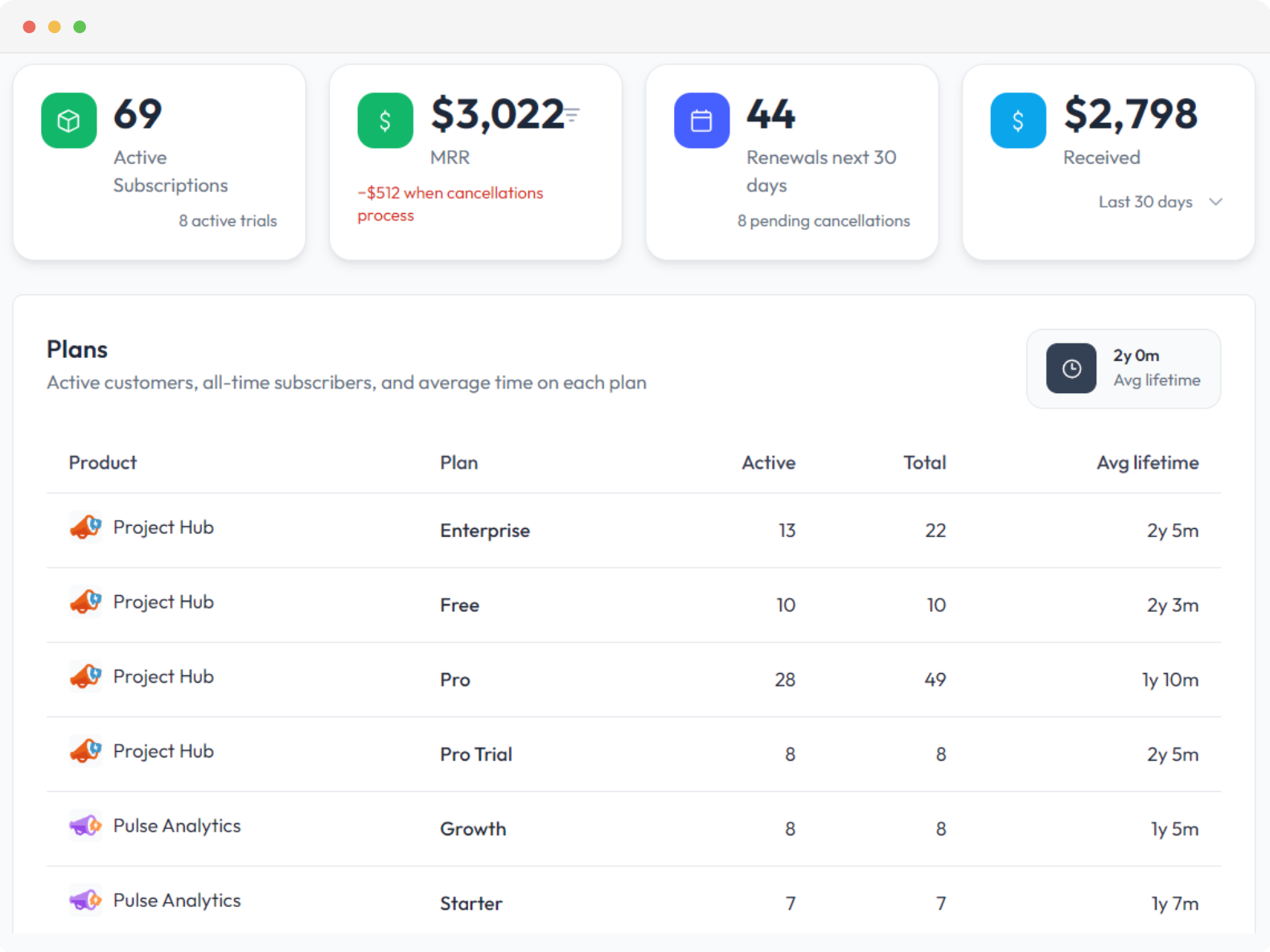
Server complements the free, open-source libraries. The integration in this article embeds Core directly and doesn’t call Server; you can run the sample and build on it without purchasing the management application.
Where Stripe fits
So far, the sample has granted access directly. In a paid application, a successful purchase can trigger that work instead.
Subscrio Core includes StripeIntegrationService. Its CreateCheckoutSessionAsync helper creates recurring Checkout sessions, creates or links Stripe customers, and uses the billing cycle’s ExternalProductId to identify the Stripe price. ProcessStripeEventAsync synchronizes customer events, recurring plan changes and cancellations, and successful invoice payments into Subscrio.
Your web application hosts the endpoint and verifies each webhook before handing it to the service. Core provides StripeConfig.ConstructStripeEvent for signature verification using the configured webhook secret. Feature checks then read the updated entitlements through the same ABP provider.
There is a distinction between Subscrio’s access model and this Checkout helper: the current .NET helper creates Stripe sessions in subscription mode. One-time and lifetime access are supported by the entitlement model, but a one-time payment flow must grant the corresponding access through your application’s fulfillment code.
The console sample contains no Stripe keys, Checkout flow, or webhook endpoint. Subscrio.Abp also has no dependency on ABP Commercial’s Payment or SaaS modules and doesn’t synchronize their editions or payment records. Its integration point is ABP’s feature API.
Keep feature checks in ABP
We’ve connected ABP’s feature API to a catalog of plans and customer overrides, configured that catalog in C# or JSON, and traced the result through the console sample. For Acme Manufacturing, the code checking the project limit receives 250. The customer’s assignment explains why, the override records the exception, and the Pro plan remains at 100 for everyone else.
Try the sample repository with your own features and plans. If you run into an integration issue or need a different customer mapping, share it in the repository’s issues.