
How to add feature entitlements to TypeScript with Subscrio
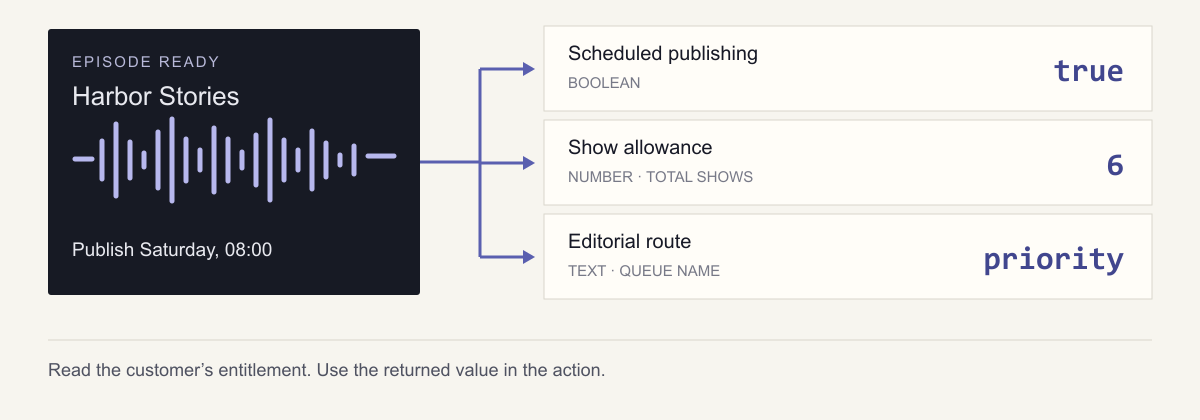
An editor has finished an episode on Friday and wants it to go live on Saturday morning. In CastCoop, a community-podcast app you’re building, that means putting the episode in a publishing queue instead of asking someone to return and publish it manually.
You offer a Free plan for a publisher running one show. A paid Collective plan supports a small network of shows and includes scheduled publishing. It also routes editorial questions to a priority queue. When the editor asks to schedule an episode, the application needs to know whether that capability is included for the customer they work for.
That is one entitlement decision, but the other plan differences need different answers. Creating another show requires a number: how many shows does this customer get? Requesting editorial help requires a label: which queue should receive the question?
In this guide we will add feature entitlements to a TypeScript app using Subscrio. We’ll build the catalog behind those decisions, assign customers to plans, and read boolean, numeric, and text values in three separate Node.js actions. Each example includes the returned value or response so you can follow the result through to the application behavior.
These Node.js actions use plan-based feature gating without branching on plan names. Each customer entitlement supplies the boolean, number, or text value the action needs.
Describe what each plan provides
Here are CastCoop’s two offerings:
| Entitlement | Free | Collective |
|---|---|---|
| Scheduled publishing | Disabled | Enabled |
| Number of shows | 1 | 6 |
| Editorial support route | standard | priority |
Neighborhood Radio will use Free. Harbor Network will use Collective. A third customer, New Publisher, has not joined either plan, which lets us check the defaults as well.
These entitlements belong to the customer. Each action reads the feature value for the publisher making the request.
Run the podcast example
The complete TypeScript example is a small Node application. Subscrio stores its catalog and subscriptions in PostgreSQL. The example calls backend methods directly, so there is no web framework or browser interface to set up.
You need Node.js and a dedicated PostgreSQL database. Create an empty database named castcoop_demo owned by the database user you will connect as. Then clone the repository and install the sample:
git clone https://github.com/subscrio/samples.git
cd samples/examples/feature-entitlements-typescript
npm ci
cp .env.example .env
In PowerShell, use Copy-Item .env.example .env for the last command. Edit .env with your local database connection details. The template contains placeholders:
DATABASE_URL=postgresql://USERNAME:PASSWORD@localhost:5432/castcoop_demo
Run the example:
npm run demo
Among its output, you’ll see the resolved values for all three customers:
neighborhood-radio: {"scheduled":false,"limit":1,"route":"standard"}
harbor-network: {"scheduled":true,"limit":6,"route":"priority"}
new-publisher: {"scheduled":false,"limit":0,"route":"none"}
The runner also exercises the actions and asserts their results. Each run starts with empty in-memory show and queue records while reusing the catalog in PostgreSQL. It demonstrates accepting work; it does not publish an episode or send a support request.
Connect Subscrio to PostgreSQL
The Node process reads the connection string and creates the Subscrio instance:
import 'dotenv/config';
import { Subscrio } from 'subscrio';

const connectionString = process.env.DATABASE_URL;
if (!connectionString)
  throw new Error(
    'Set DATABASE_URL to a dedicated PostgreSQL sample database.'
  );
const subscrio = new Subscrio({ database: { connectionString } });
For an empty sample database, install Subscrio’s schema before creating records:
if ((await subscrio.verifySchema()) === null) await subscrio.installSchema();
The runnable example closes the connection with await subscrio.close() in a finally block. The following setup calls use its actual keys and values, expanded from catalog.ts into separate steps. The full sample checks for existing records so setup can run again.
Create the product
The features and plans belong to CastCoop. Create the product first:
await subscrio.products.createProduct({
  key: 'castcoop',
  displayName: 'CastCoop'
});
Define the three features
Scheduled publishing is a yes-or-no capability, represented by a toggle. The show limit is numeric. The editorial route is text: it names a queue rather than measuring how much support a customer has.
Set defaults for a customer with no applicable subscription. That customer cannot schedule publishing or create a show and has no editorial route:
await subscrio.features.createFeature({
  key: 'scheduled-publishing',
  displayName: 'Scheduled publishing',
  valueType: 'toggle',
  defaultValue: 'false'
});
await subscrio.features.createFeature({
  key: 'show-limit',
  displayName: 'Show limit',
  valueType: 'numeric',
  defaultValue: '0'
});
await subscrio.features.createFeature({
  key: 'editorial-route',
  displayName: 'Editorial route',
  valueType: 'text',
  defaultValue: 'none'
});
Free customers will receive their plan’s values. Being on a free plan and having no subscription are different states in this example.
Associate the features with CastCoop
Associate each feature with the product so CastCoop’s plans can supply its value:
await subscrio.products.associateFeature('castcoop', 'scheduled-publishing');
await subscrio.products.associateFeature('castcoop', 'show-limit');
await subscrio.products.associateFeature('castcoop', 'editorial-route');
Create the plans
Define Free and Collective under the product:
await subscrio.plans.createPlan({
  key: 'castcoop-free',
  productKey: 'castcoop',
  displayName: 'Free'
});
await subscrio.plans.createPlan({
  key: 'castcoop-collective',
  productKey: 'castcoop',
  displayName: 'Collective'
});
Assign the plan values
Give each plan the values from the comparison table. Subscrio stores feature values as strings; the checking methods below return the types the application needs.
await subscrio.plans.setFeatureValue(
  'castcoop-free',
  'scheduled-publishing',
  'false'
);
await subscrio.plans.setFeatureValue('castcoop-free', 'show-limit', '1');
await subscrio.plans.setFeatureValue(
  'castcoop-free',
  'editorial-route',
  'standard'
);
await subscrio.plans.setFeatureValue(
  'castcoop-collective',
  'scheduled-publishing',
  'true'
);
await subscrio.plans.setFeatureValue('castcoop-collective', 'show-limit', '6');
await subscrio.plans.setFeatureValue(
  'castcoop-collective',
  'editorial-route',
  'priority'
);
Create the billing cycles
A subscription selects a billing cycle belonging to a plan. Free is ongoing, so its cycle uses forever without a duration value. Collective uses a monthly cycle. Create these reusable catalog records before assigning customers:
await subscrio.billingCycles.createBillingCycle({
  key: 'castcoop-free-ongoing',
  planKey: 'castcoop-free',
  displayName: 'Free ongoing',
  durationUnit: 'forever'
});
await subscrio.billingCycles.createBillingCycle({
  key: 'castcoop-collective-monthly',
  planKey: 'castcoop-collective',
  displayName: 'Collective monthly',
  durationUnit: 'months',
  durationValue: 1
});
Creating a billing cycle does not charge a customer. Here it establishes the agreement option that a subscription will reference.
Create the customers
Give each publisher a customer record. These keys identify who receives the entitlements:
await subscrio.customers.createCustomer({
  key: 'neighborhood-radio',
  displayName: 'Neighborhood Radio'
});
await subscrio.customers.createCustomer({
  key: 'harbor-network',
  displayName: 'Harbor Network'
});
await subscrio.customers.createCustomer({
  key: 'new-publisher',
  displayName: 'New publisher'
});
Assign the subscriptions
Connect Neighborhood Radio to Free and Harbor Network to Collective using the cycles created earlier:
await subscrio.subscriptions.createSubscription({
  key: 'neighborhood-radio-free',
  customerKey: 'neighborhood-radio',
  billingCycleKey: 'castcoop-free-ongoing'
});
await subscrio.subscriptions.createSubscription({
  key: 'harbor-network-collective',
  customerKey: 'harbor-network',
  billingCycleKey: 'castcoop-collective-monthly'
});
Harbor Network now reaches Collective’s feature values through its subscription and monthly cycle. Neighborhood Radio reaches Free’s values through its ongoing cycle. Leave New Publisher without a subscription to test the feature defaults.
The demo assigns these agreements directly. In an application, create them when a customer joins the free offering or confirms a paid purchase.
Decide whether an episode can be scheduled
Return to the editor’s Saturday release. The scheduling action needs to ask whether scheduled-publishing is enabled for the editor’s customer. It does not need to recognize the name Collective.
The methods in actions.ts use this.subscrio for entitlement checks. Their customerKey argument identifies the publisher whose entitlements to check. Here is the complete scheduling method:
async scheduleEpisode(customerKey: string, request: ScheduleRequest) {
  const allowed = await this.subscrio.featureChecker.isEnabledForCustomer(
    customerKey,
    'castcoop',
    'scheduled-publishing'
  );
  if (!allowed) return { error: 'scheduled_publishing_not_included' } as const;

  this.scheduled.push({ customerKey: customerKey, ...request });
  return { status: 'queued', ...request } as const;
}
The feature check returns true for Harbor Network and false for Neighborhood Radio. The sample’s queue is an array, which makes it easy to inspect whether the application accepted work.
For a concrete call, the demo supplies Harbor Network’s customer key and a release request:
import { PodcastActions } from './actions.js';

const actions = new PodcastActions(subscrio);
const collective = 'harbor-network';
const request = {
  episodeKey: 'harbor-stories-12',
  publishAt: '2030-04-06T08:00:00Z'
};
await actions.scheduleEpisode(collective, request);
The returned object is:
{
  "status": "queued",
  "episodeKey": "harbor-stories-12",
  "publishAt": "2030-04-06T08:00:00Z"
}
The same request for Neighborhood Radio returns this result, without adding an entry to the queue:
{ "error": "scheduled_publishing_not_included" }
Read the numeric entitlement before creating a show
A publisher adding a second show needs a quantity rather than a boolean. Inside createShow, the sample reads the show-limit feature:
const limit =
  (await this.subscrio.featureChecker.getValueForCustomer(
    customerKey,
    'castcoop',
    'show-limit',
    0
  )) ?? 0;
The final argument, numeric 0, selects numeric conversion in TypeScript. It is not enough to write a TypeScript generic and assume a stored string changes type at runtime. The sample verifies that the result is a number.
| Customer | Returned allowance |
|---|---|
| Neighborhood Radio | 1 |
| Harbor Network | 6 |
| New Publisher | 0 |
For Harbor Network, 6 means six shows in total, not six more shows. The application counts the customer’s current shows and compares that count with the allowance. Subscrio supplies the plan value; the application owns the show records.
After creating Neighborhood Radio’s first show, the demo tries to create a second. The action returns:
{ "error": "show_limit_reached", "limit": 1, "used": 1 }
The verification also checks that Collective can create six shows and rejects a seventh.
Route editorial help using a text entitlement
An editor asking for help with a trailer needs their request routed to the right team. Both plans provide support, so a yes-or-no check would lose the distinction. Read the editorial-route text value instead:
const route = await this.subscrio.featureChecker.getValueForCustomer(
  customerKey,
  'castcoop',
  'editorial-route',
  'none'
);
if (route !== 'standard' && route !== 'priority') {
  return { error: 'editorial_support_not_included' } as const;
}
This excerpt comes from requestEditorialHelp. The returned strings are standard for Neighborhood Radio, priority for Harbor Network, and none for New Publisher. The application recognizes its two queue names explicitly. These are labels, not numbers to compare or rank.
Harbor Network’s request for “Review our trailer” produces this response:
{ "status": "queued", "queue": "priority", "subject": "Review our trailer" }
Neighborhood Radio’s response has "queue": "standard". New Publisher receives {"error":"editorial_support_not_included"}, and no request enters an editorial queue.
Use the result that fits the decision
All three actions check the same customer and product scope, but each uses the result differently. The publishing action branches on a boolean. Show creation uses a numeric allowance. Editorial help uses a text value to select a destination.
Run the CastCoop sample, then change one plan value and observe the corresponding decision. The feature entitlements guide explains the catalog relationships, and the TypeScript library guide covers where Subscrio fits in a Node application. For a .NET implementation, see the ASP.NET Core how-to.