
How to combine subscription entitlements in TypeScript with Subscrio
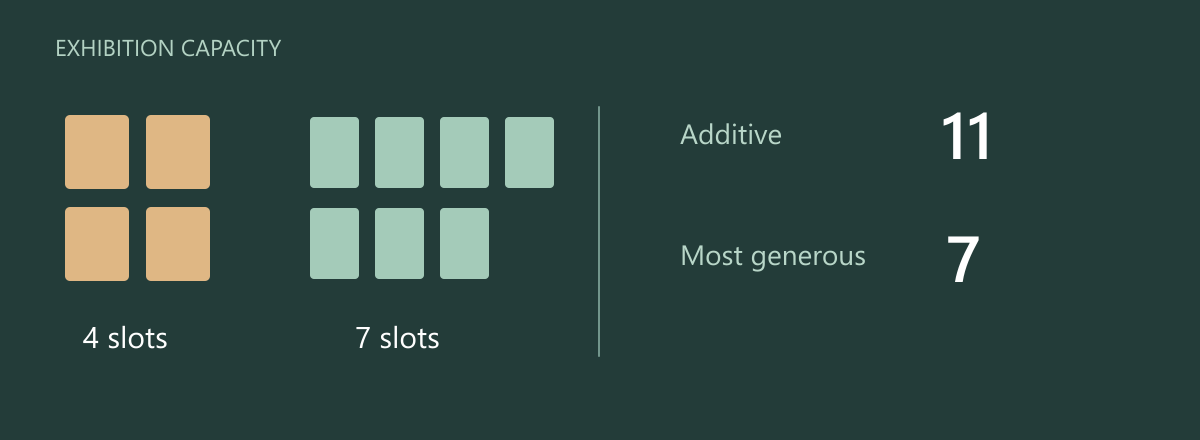
ExhibitLoop manages screens for a museum with two independently funded exhibitions. One agreement includes four display slots and another includes seven. The museum expects eleven usable slots, but that result depends on how values from multiple subscriptions are combined.
In this guide we will compare additive and most-generous entitlement resolution in TypeScript using the same two agreements, then inspect where the final value came from.
For this numeric entitlement, the most-generous rule selects the maximum eligible subscription allowance. Additive resolution sums those allowances instead. Both rules combine separate subscriptions, rather than quantities of an add-on attached to one agreement.
Define the customer promise
| Combination rule | Four-slot and seven-slot agreements |
|---|---|
| Most generous | 7 display slots |
| Additive | 11 display slots |
ExhibitLoop chooses addition because each exhibition purchases separate capacity. The test changes only the combination rule, keeping the purchased values the same.
Run the example
The complete ExhibitLoop sample contains the setup and executable assertions used below. Use Node.js and a local PostgreSQL server. Copy the environment example and set DATABASE_URL to a development connection with permission to create databases. The runner creates and removes its own isolated database.
git clone https://github.com/subscrio/samples.git
cd samples/examples/combine-subscription-entitlements-typescript
cp .env.example .env
# Set DATABASE_URL in .env before running.
npm ci
npm test
The snippets run in order within that program. check prints the returned value and asserts that it matches the expected result. The outputs below come from the executable sample.
Initialize Subscrio
The helper supplies the disposable PostgreSQL database connection. Install the schema before creating any catalog records.
const clock: { at: Date | null } = { at: null };
const app = new Subscrio({
  database: { connectionString: db.connectionString },
  clock: { now: () => clock.at ?? new Date() }
});
await app.installSchema();
The full runner supplies the imports, database helper, and cleanup. The clock uses the current time throughout this example.
Create the product
Keep ExhibitLoop’s catalog under one product.
await app.products.createProduct({
  key: 'exhibitloop',
  displayName: 'ExhibitLoop'
});
Define the feature
The numeric display-slots feature represents purchased screen capacity. Its zero default contributes no slots without an eligible agreement.
await app.features.createFeature({
  key: 'display-slots',
  displayName: 'display-slots',
  valueType: 'numeric',
  defaultValue: '0'
});
Associate the feature
Associate this feature with ExhibitLoop so its plan can supply the customer’s value.
await app.products.associateFeature('exhibitloop', 'display-slots', {
  subscriptionRule: 'most_generous'
});
Create the plan
The first exhibition needs a plan with four display slots. We will create the visiting exhibition’s separate seven-slot plan afterward.
await app.plans.createPlan({
  key: 'standard',
  productKey: 'exhibitloop',
  displayName: 'standard'
});
Assign the plan value
The first exhibition plan provides four display slots.
await app.plans.setFeatureValue('standard', 'display-slots', '4');
Create the billing cycle
Create the monthly catalog option before assigning it to a customer.
await app.billingCycles.createBillingCycle({
  key: 'standard-cycle',
  planKey: 'standard',
  displayName: 'Monthly',
  durationUnit: 'months',
  durationValue: 1
});
Create the customer
The sample uses the key customer for the ExhibitLoop purchaser. Creating this record identifies the recipient; the subscription will assign their plan.
await app.customers.createCustomer({
  key: 'customer',
  displayName: 'ExhibitLoop customer'
});
Create the second exhibition plan
Create a separate offering for the visiting exhibition before assigning its allowance.
await app.plans.createPlan({
  key: 'visiting',
  productKey: 'exhibitloop',
  displayName: 'Visiting exhibition'
});
Set the visiting exhibition allowance
This plan contributes seven display slots.
await app.plans.setFeatureValue('visiting', 'display-slots', '7');
Create the second billing cycle
Both offers must exist before assigning the exhibition agreements.
await app.billingCycles.createBillingCycle({
  key: 'visiting-cycle',
  planKey: 'visiting',
  displayName: 'Monthly',
  durationUnit: 'months',
  durationValue: 1
});
Create the customer subscription
The first agreement selects standard-cycle and supplies four display slots. Next we will assign the same customer a second subscription for the visiting exhibition.
await app.subscriptions.createSubscription({
  key: 'agreement',
  customerKey: 'customer',
  billingCycleKey: 'standard-cycle',
  activationDate: clock.at ?? new Date()
});
Assign the visiting exhibition
There are now two eligible agreements for one customer and product.
await app.subscriptions.createSubscription({
  key: 'visiting-agreement',
  customerKey: 'customer',
  billingCycleKey: 'visiting-cycle'
});
Resolve the maximum subscription allowance
The association currently selects the largest subscription value. It does not add the values.
check(
  'Most generous display slots',
  await app.featureChecker.getValueForCustomer(
    'customer',
    'exhibitloop',
    'display-slots',
    0
  ),
  7
);
Output:
Most generous display slots: 7
Combine subscription allowances with additive resolution
Change the association to additive because these exhibition allowances are intended to accumulate.
await app.products.associateFeature('exhibitloop', 'display-slots', {
  subscriptionRule: 'additive'
});
check(
  'Combined display slots',
  await app.featureChecker.getValueForCustomer(
    'customer',
    'exhibitloop',
    'display-slots',
    0
  ),
  11
);
Output:
Combined display slots: 11
Explain the returned allowance
The explanation lists the contributing subscriptions alongside the resolved value. Unlike the numeric getter above, effectiveValue and the contributing value fields are strings, so the output contains "11", "4", and "7". This lets you trace the eleven-slot allowance back to the two purchases.
const explanation = await app.featureChecker.explainForCustomer(
  'customer',
  'exhibitloop',
  'display-slots'
);
check('Explained value', explanation.effectiveValue, '11');
check(
  'Contributing values',
  explanation.subscriptions.map(s => s.value).sort(),
  ['4', '7']
);
Output:
Explained value: "11"
Contributing values: ["4","7"]
Use the result in your application
The same four and seven slots can legitimately resolve to seven or eleven. ExhibitLoop makes that choice explicit on the product-feature association, then uses the explanation to show the contribution from each agreement. Choose the rule that matches what the customer purchased before relying on the final number.
Run the complete ExhibitLoop example to reproduce the checks. The Subscrio subscription feature gating guide explains the related model.
For a related C# example, see expiring feature overrides in C#. A related next step is feature bundles in TypeScript.