
How to add subscription capacity add-ons in C# with Subscrio
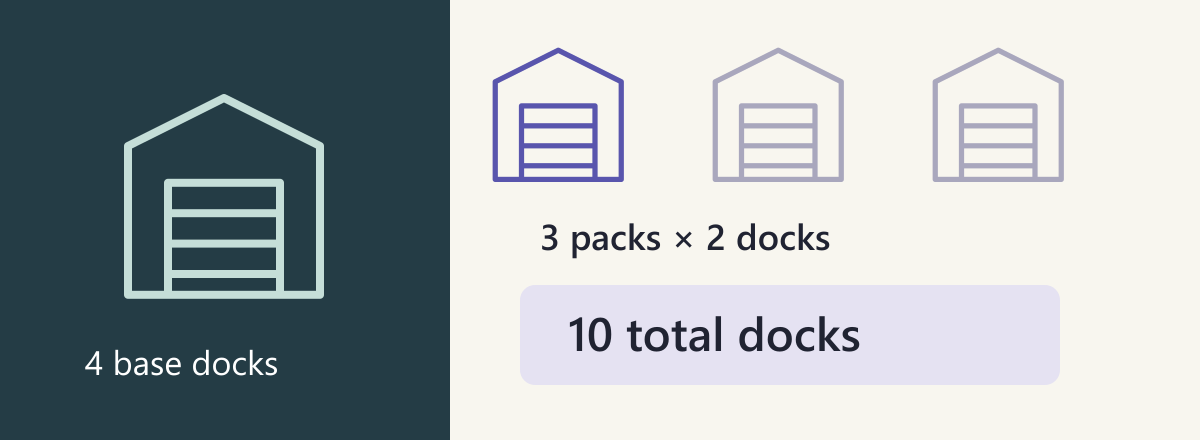
A warehouse uses DockFlow to coordinate dispatch across its loading docks. Its base subscription starts with four dispatch docks. It buys three capacity packs, each adding two docks. Later the purchase is reduced to one pack. That update must replace the quantity, not add another pack to the previous three.
In this guide we will add quantity-based subscription capacity add-ons in C# and verify the total after attachment, a quantity change, a repeated write, and detachment.
Each capacity pack is a quantity-based subscription add-on. Subscrio combines the base allowance with the purchased add-on quantity, so the application can read one effective capacity limit.
Define the customer promise
| Purchased packs | Calculation | Total docks |
|---|---|---|
| None | Base allowance | 4 |
| Three | 4 + 3 × 2 | 10 |
| One | 4 + 1 × 2 | 6 |
Run the example
Get the complete runnable example. Install the .NET SDK and SQL Server Express LocalDB on Windows. The sample uses Windows integrated authentication and the MSSQLLocalDB instance.
git clone https://github.com/subscrio/samples.git
cd samples/examples/subscription-capacity-packs-csharp
sqllocaldb start MSSQLLocalDB
dotnet restore --locked-mode --source https://api.nuget.org/v3/index.json
dotnet run --no-restore
The C# runner uses SQL Server Express LocalDB on Windows with integrated authentication. Each run creates and removes its own disposable database.
The snippets below belong to that single program and run in order. Check compares a returned value with the expected value, prints it, and fails the run if they differ. The displayed output was captured from the sample.
Initialize Subscrio
The database helper supplies the LocalDB connection string. Install the schema before creating catalog records.
using var app = new Subscrio.Core.Subscrio(
    new SubscrioConfig
    {
        Database = new DatabaseConfig
        {
            ConnectionString = database.ConnectionString,
            DatabaseType = DatabaseType.SqlServer
        }
    }
);
await app.InstallSchemaAsync();
Create the product
DockFlow’s plans belong to one product. The runner creates a new LocalDB database for each run, so these readable keys do not collide with earlier examples.
await app.Products.CreateProductAsync(new("dockflow", "DockFlow"));
Define the feature
The dispatch-docks numeric feature represents the total docks a warehouse may use. It defaults to zero. The plan provides four and purchased packs will add to that allowance.
await app.Features.CreateFeatureAsync(
    new("dispatch-docks", "dispatch-docks", "numeric", "0")
);
Associate the feature
Use additive for add-ons so each purchased pack contributes to the base allowance. The most_generous subscription rule selects the largest eligible subscription total if the customer has more than one; this example uses one subscription.
await app.Products.AssociateFeatureAsync(
    "dockflow",
    "dispatch-docks",
    new FeatureResolutionOptions(
        AddonRule: "additive",
        SubscriptionRule: "most_generous"
    )
);
Create the plan
Create the Warehouse plan under DockFlow. Its base allowance will be four dispatch docks.
await app.Plans.CreatePlanAsync(new("dockflow", "warehouse", "warehouse"));
Set the plan value
The plan supplies 4 for dispatch-docks. The application will resolve it through the customer’s subscription.
await app.Plans.SetFeatureValueAsync("warehouse", "dispatch-docks", "4");
Create the billing cycle
The subscription will reference this monthly catalog record. Creating it does not collect payment.
await app.BillingCycles.CreateBillingCycleAsync(
    new("warehouse", "warehouse-monthly", "Monthly", "months", DurationValue: 1)
);
Create the customer
Create the customer who receives the agreement.
await app.Customers.CreateCustomerAsync(new("customer", "DockFlow demo customer"));
Assign the subscription
The agreement subscription connects customer to warehouse-monthly, which belongs to the Warehouse plan. It supplies four docks before any packs are attached.
await app.Subscriptions.CreateSubscriptionAsync(
    new("agreement", "customer", "warehouse-monthly")
);
Define the capacity add-on
The association explicitly uses additive composition. Each unit contributes two docks on top of the base four.
await app.Addons.CreateAddonAsync(
    new(
        "two-dock-pack",
        "dockflow",
        "Two dispatch docks",
        FeatureValues: new() { ["dispatch-docks"] = "2" }
    )
);
Check(
    "Base docks",
    await app.FeatureChecker.GetValueForCustomerAsync<int>(
        "customer",
        "dockflow",
        "dispatch-docks",
        0
    ),
    4
);
Captured output:
Base docks: 4
Set the purchased quantity to three
The allowance is four plus three times two.
await app.Subscriptions.AttachAddonAsync("agreement", "two-dock-pack", 3);
Check(
    "Three packs",
    await app.FeatureChecker.GetValueForCustomerAsync<int>(
        "customer",
        "dockflow",
        "dispatch-docks",
        0
    ),
    10
);
Captured output:
Three packs: 10
Update the purchased add-on quantity
The attachment method writes an absolute quantity. A repeated write of one must still resolve to six.
await app.Subscriptions.AttachAddonAsync("agreement", "two-dock-pack", 1);
Check(
    "One pack",
    await app.FeatureChecker.GetValueForCustomerAsync<int>(
        "customer",
        "dockflow",
        "dispatch-docks",
        0
    ),
    6
);
await app.Subscriptions.AttachAddonAsync("agreement", "two-dock-pack", 1);
Check(
    "One pack repeated",
    await app.FeatureChecker.GetValueForCustomerAsync<int>(
        "customer",
        "dockflow",
        "dispatch-docks",
        0
    ),
    6
);
Captured output:
One pack: 6
One pack repeated: 6
Remove the add-on and restore base capacity
Detachment restores the base allowance; it does not remove DockFlow records on the customer’s behalf.
await app.Subscriptions.DetachAddonAsync("agreement", "two-dock-pack");
Check(
    "Detached",
    await app.FeatureChecker.GetValueForCustomerAsync<int>(
        "customer",
        "dockflow",
        "dispatch-docks",
        0
    ),
    4
);
Captured output:
Detached: 4
Read the result
Attaching quantity three produces ten docks. Setting quantity one produces six; writing one again still produces six. Detaching the pack returns four. If the warehouse already uses more docks than its new allowance, deciding what to do with that existing work belongs to the application.
Run the complete C# example to reproduce the entitlement decisions and their expected results.