
How to keep feature access stable when Stripe prices change
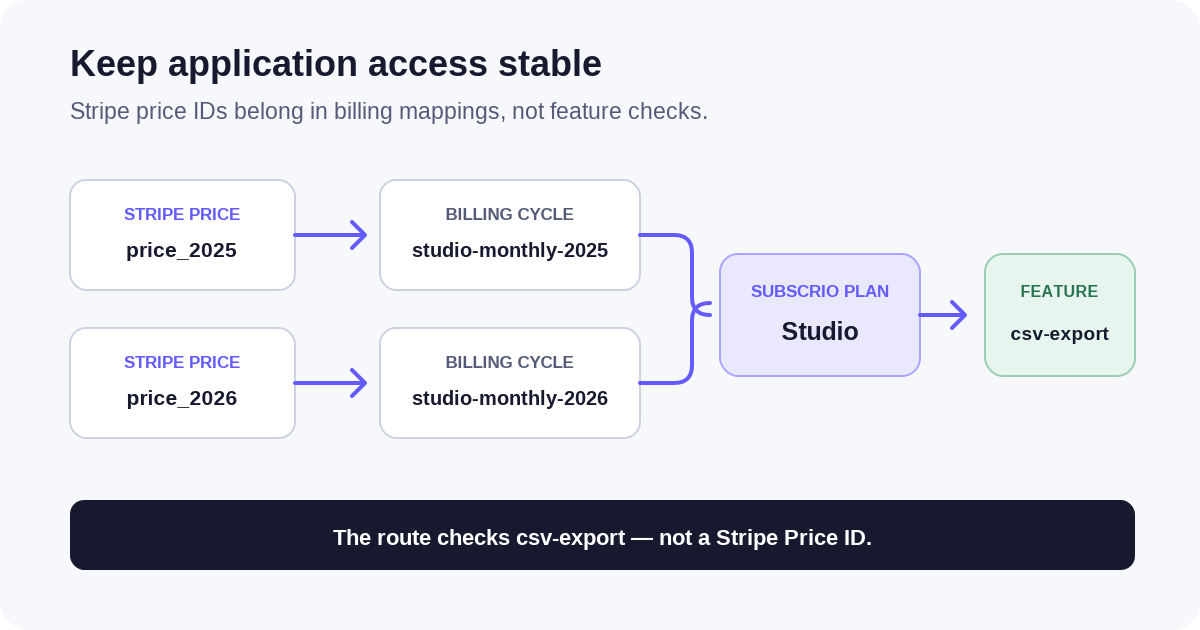
Subscrio lets application code check a feature such as csv-export while Stripe Price IDs stay in the billing catalog. When you replace price_feedbackdesk_2025 with price_feedbackdesk_2026, map the new identifier to another billing cycle under the same plan. Customers on both cycles can then reach the same export check.
If the route compares a Stripe Price ID directly, every price revision creates another authorization branch. A feature check keeps the decision tied to what the customer bought, while the billing-cycle mapping handles which Stripe price represents that offer.
Keep billing identifiers at the billing boundary
A Stripe Price ID identifies a price in Stripe. Checkout uses it to start a purchase, and Subscrio’s Stripe integration uses it to find the matching billing cycle. It does not need to name a capability in your application.
For example, FeedbackDesk may sell a Studio plan that includes CSV export. Stripe can have an older monthly price and a replacement monthly price for that same offer. In Subscrio, create two billing cycles under the studio plan and map each cycle to its corresponding Stripe Price ID:
| Subscrio billing cycle | Stripe Price ID | Plan | CSV export |
|---|---|---|---|
studio-monthly-2025 | price_feedbackdesk_2025 | Studio | Enabled |
studio-monthly-2026 | price_feedbackdesk_2026 | Studio | Enabled |
The IDs above are placeholders. When you configure your catalog, use Price IDs from the Stripe account and mode used by your Checkout and webhook integration. Subscrio stores each one in the billing cycle’s externalProductId field; the Stripe setup guide walks through that mapping.
Create one plan and a stable feature
Create a feature named csv-export and set its Studio value to true. If Stripe replaces the monthly price next year, this feature key stays put.
These excerpts assume a PostgreSQL-backed Subscrio instance and schema initialized as shown in the getting started guide.
await subscrio.products.createProduct({
  key: 'feedbackdesk',
  displayName: 'FeedbackDesk',
});

await subscrio.features.createFeature({
  key: 'csv-export',
  displayName: 'CSV export',
  valueType: 'toggle',
  defaultValue: 'false',
});

await subscrio.products.associateFeature('feedbackdesk', 'csv-export');
await subscrio.plans.createPlan({
  key: 'studio',
  productKey: 'feedbackdesk',
  displayName: 'Studio',
});
await subscrio.plans.setFeatureValue('studio', 'csv-export', 'true');
The C# catalog uses the same product, feature, and plan keys:
await subscrio.Products.CreateProductAsync(new("feedbackdesk", "FeedbackDesk"));
await subscrio.Features.CreateFeatureAsync(
    new("csv-export", "CSV export", "toggle", "false"));
await subscrio.Products.AssociateFeatureAsync("feedbackdesk", "csv-export");
await subscrio.Plans.CreatePlanAsync(new("feedbackdesk", "studio", "Studio"));
await subscrio.Plans.SetFeatureValueAsync("studio", "csv-export", "true");
Create a billing cycle for each price. Both cycles belong to studio; their keys are Subscrio’s local identifiers and their externalProductId values are the Stripe Price IDs.
await subscrio.billingCycles.createBillingCycle({
  key: 'studio-monthly-2025',
  planKey: 'studio',
  displayName: 'Studio monthly (2025 price)',
  durationUnit: 'months',
  durationValue: 1,
  externalProductId: 'price_feedbackdesk_2025',
});

await subscrio.billingCycles.createBillingCycle({
  key: 'studio-monthly-2026',
  planKey: 'studio',
  displayName: 'Studio monthly (2026 price)',
  durationUnit: 'months',
  durationValue: 1,
  externalProductId: 'price_feedbackdesk_2026',
});
await subscrio.BillingCycles.CreateBillingCycleAsync(new(
    "studio", "studio-monthly-2025", "Studio monthly (2025 price)",
    "months", DurationValue: 1,
    ExternalProductId: "price_feedbackdesk_2025"));

await subscrio.BillingCycles.CreateBillingCycleAsync(new(
    "studio", "studio-monthly-2026", "Studio monthly (2026 price)",
    "months", DurationValue: 1,
    ExternalProductId: "price_feedbackdesk_2026"));
The billing-cycle reference documents externalProductId. Use the cycle associated with the new Stripe price when you create Checkout Sessions. Existing subscriptions remain mapped to their own cycle until the Stripe integration updates them.
Check the feature in the application
The export handler asks Subscrio for csv-export. Its customerKey must come from the signed-in user’s account membership, not from a query parameter or a posted value.
async function exportCsv(customerKey: string) {
  const canExport = await subscrio.featureChecker.isEnabledForCustomer(
    customerKey,
    'feedbackdesk',
    'csv-export',
  );

  if (!canExport) {
    return Response.json({ error: 'export_not_included' }, { status: 403 });
  }

  return new Response('feedback,votes\nDark mode,12', {
    headers: { 'content-type': 'text/csv; charset=utf-8' },
  });
}
The ASP.NET Core handler makes the same check after the request identifies the customer:
using System.Security.Claims;

app.MapGet("/api/feedback/export", async (
    ClaimsPrincipal user,
    Subscrio.Core.Subscrio subscrio) =>
{
    var customerKey = user.FindFirstValue("customer_key");
    if (string.IsNullOrWhiteSpace(customerKey))
        return Results.Unauthorized();

    var canExport = await subscrio.FeatureChecker.IsEnabledForCustomerAsync(
        customerKey, "feedbackdesk", "csv-export");
    if (!canExport)
        return Results.Json(new { error = "export_not_included" }, statusCode: 403);

    return Results.Text("feedback,votes\nDark mode,12", "text/csv");
});
Both Studio cycles resolve to the same csv-export value. The Free plan has the feature set to false, so its export request is denied. Neither handler needs to know which Stripe price is on the customer’s subscription.
Run the paired sample
The complete sample repository has the Next.js route, the ASP.NET Core Minimal API, and the catalog seeding code. It runs against a dedicated PostgreSQL database and uses placeholder Price IDs. It makes no Stripe API calls.
git clone https://github.com/subscrio/samples.git
cd samples/examples/stripe-price-id-feature-access/typescript
npm ci
Set DATABASE_URL to an empty development database, run npm run seed, then start the site with npm run dev. The C# project README has its own database setup and HTTP verification command. Both demos accept only three fixed customer keys. In a real application, pass a key from your authenticated user’s membership record.
Replace a price without rewriting access checks
When you introduce a new Stripe price:
- Create the price in Stripe.
- Add a Subscrio billing cycle under the plan that represents the same offer and set its
externalProductIdto the new Stripe Price ID. - Use that cycle for new Checkout Sessions.
- Keep the previous cycle available while existing Stripe subscriptions still reference its price and the webhook integration needs to match it.
- Continue checking
csv-exportin the application.
The renewal guide shows how to connect Stripe events to Subscrio subscription state in C# and TypeScript. Use Stripe test mode while validating your mapping. A Price ID change by itself does not update an existing customer or determine what should happen after cancellation, a failed payment, a refund, or a grace period.
Keep access policy separate from price mapping
The feature check resolves the feature value for the customer and product. Your application still decides how authentication, account membership, subscription status, refunds, and any grace period affect a request. Do not accept an arbitrary customer key from a query string or route parameter in a production handler; derive it from the authenticated principal.
If an account has a negotiated exception, a subscription-level override can change the feature value without creating a new Stripe price or plan. See the feature entitlements guide for how plan values and customer-specific overrides resolve.
Map Stripe’s price identifiers to billing cycles, map those cycles to the plan that represents the offer, and check the stable feature in application code. A pricing update then changes billing configuration without adding another Stripe identifier to the access check.
Disclosure: This implementation guide is written by the Subscrio team. Stripe Price IDs and customer names in the examples are illustrative placeholders.