
How to share application credits across products in TypeScript with Subscrio
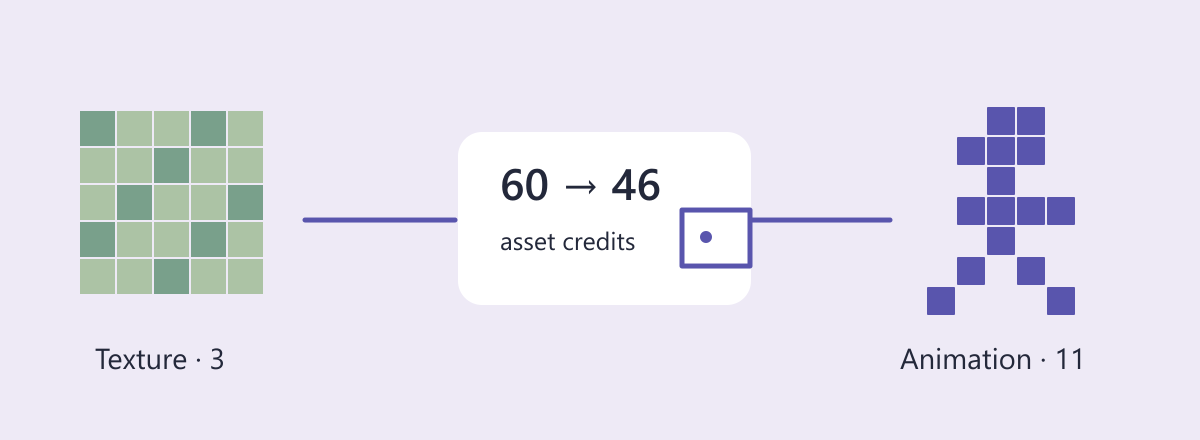
SpriteMint sells two tools to game artists: a texture generator and a sprite animator. Customers subscribe to both products but spend one pool of asset credits. Generating a texture costs three credits, and animating a sprite costs eleven.
In this guide we will share a credit wallet across products in TypeScript, fund it through one subscription, and keep each product’s access decision separate from the shared balance.
These are application credits shared across products. The wallet belongs to the customer and currency; each product still checks its own entitlement before spending from the common balance.
Define the customer promise
| Product | Cost per operation | Monthly funding |
|---|---|---|
| Texture generator | 3 asset credits | 60 asset credits |
| Sprite animator | 11 asset credits | None |
The animator has its own subscription but uses the same customer and currency. A second product is not a second wallet.
Run the example
The complete SpriteMint sample contains the setup and executable assertions used below. Use Node.js and a local PostgreSQL server. Copy the environment example and set DATABASE_URL to a development connection with permission to create databases. The runner creates and removes its own isolated database.
git clone https://github.com/subscrio/samples.git
cd samples/examples/shared-credit-wallet-typescript
cp .env.example .env
# Set DATABASE_URL in .env before running.
npm ci
npm test
The snippets run in order within that program. check prints the returned value and asserts that it matches the expected result. The outputs below come from the executable sample.
Initialize Subscrio
The helper supplies the disposable PostgreSQL database connection. Install the schema before creating any catalog records.
const clock: { at: Date | null } = { at: null };
const app = new Subscrio({
  database: { connectionString: db.connectionString },
  clock: { now: () => clock.at ?? new Date() }
});
await app.installSchema();
The full runner supplies the imports, database helper, and cleanup. The clock uses the current time throughout this example.
Create the product
Create the texture-generation product first. Animation will get its own product below.
await app.products.createProduct({
  key: 'spritemint',
  displayName: 'SpriteMint'
});
Define the feature
The texture toggle decides whether the customer can use the texture generator. Its false default denies access without a qualifying agreement.
await app.features.createFeature({
  key: 'texture',
  displayName: 'texture',
  valueType: 'toggle',
  defaultValue: 'false'
});
Associate the feature
Associate this feature with SpriteMint so its plan can supply the customer’s value.
await app.products.associateFeature('spritemint', 'texture', {
  subscriptionRule: 'most_generous'
});
Create the plan
This first plan belongs to the texture product. It will enable texture generation and fund the shared wallet; the animation plan will supply its own access.
await app.plans.createPlan({
  key: 'standard',
  productKey: 'spritemint',
  displayName: 'standard'
});
Assign the plan value
The texture plan enables generation. Its credit funding is configured separately below.
await app.plans.setFeatureValue('standard', 'texture', 'true');
Create the billing cycle
Create the monthly catalog option before assigning it to a customer.
await app.billingCycles.createBillingCycle({
  key: 'standard-cycle',
  planKey: 'standard',
  displayName: 'Monthly',
  durationUnit: 'months',
  durationValue: 1
});
Create the customer
The sample uses the key customer for the SpriteMint purchaser. Creating this record identifies the recipient; the subscription will assign their plan.
await app.customers.createCustomer({
  key: 'customer',
  displayName: 'SpriteMint customer'
});
Create the animation product
Animation has its own product and agreement, even though it spends the same currency.
await app.products.createProduct({
  key: 'animation',
  displayName: 'Sprite animation'
});
Define animation access
The animator has a separate entitlement from texture generation.
await app.features.createFeature({
  key: 'animate',
  displayName: 'Animate sprite',
  valueType: 'toggle',
  defaultValue: 'false'
});
Associate animation access
Link this capability to the animation product.
await app.products.associateFeature('animation', 'animate', {
  subscriptionRule: 'most_generous'
});
Create the animation plan
The animation plan supplies access to the animator.
await app.plans.createPlan({
  key: 'animator',
  productKey: 'animation',
  displayName: 'Animator'
});
Include animation access
The animation plan enables its tool.
await app.plans.setFeatureValue('animator', 'animate', 'true');
Create its billing cycle
The second agreement uses its own monthly catalog option.
await app.billingCycles.createBillingCycle({
  key: 'animator-cycle',
  planKey: 'animator',
  displayName: 'Monthly',
  durationUnit: 'months',
  durationValue: 1
});
Create the shared application credit wallet
A currency wallet belongs to the customer, not to a product.
await app.credits.createCurrency({
  key: 'asset-credits',
  displayName: 'Asset credits'
});
Fund the wallet from one plan
Only the texture plan grants credits. The animation subscription adds access without duplicating the monthly funding.
await app.credits.setPlanGrant('standard', 'asset-credits', {
  amount: 60,
  cadence: 'monthly'
});
Price texture and animation work
Both rules name asset-credits, so they draw from the same wallet.
await app.credits.setConsumptionRule('texture', 'asset-credits', 3);
await app.credits.setConsumptionRule('animate', 'asset-credits', 11);
Create the customer subscription
The agreement subscription selects the texture plan through standard-cycle. That plan enables texture generation and supplies the monthly 60-credit grant.
await app.subscriptions.createSubscription({
  key: 'agreement',
  customerKey: 'customer',
  billingCycleKey: 'standard-cycle',
  activationDate: clock.at ?? new Date()
});
Add the animation agreement
The customer now has access to both products. There is still only one funded currency.
await app.subscriptions.createSubscription({
  key: 'animation-agreement',
  customerKey: 'customer',
  billingCycleKey: 'animator-cycle'
});
Read the funded wallet
getBalance reconciles due subscription grants before returning the balance. The texture plan’s first monthly grant therefore supplies 60 credits on this read; the animation subscription contributes no grant. available is the number of credits the customer can spend now.
check(
  'Shared opening balance',
  (await app.credits.getBalance('customer', 'asset-credits')).available,
  60
);
Output:
Shared opening balance: 60
Spend cross-product credits from one balance
Resolve the appropriate product entitlement before debiting the wallet. The resulting balance reflects both tools.
async function makeAsset(product: string, feature: string, jobKey: string) {
  if (
    !(await app.featureChecker.getValueForCustomer(
      'customer',
      product,
      feature,
      false
    ))
  )
    return 'not_included';
  await app.credits.consume({
    customerKey: 'customer',
    featureKey: feature,
    units: 1,
    idempotencyKey: jobKey
  });
  return 'accepted';
}
check(
  'Texture job',
  await makeAsset('spritemint', 'texture', 'texture-oak'),
  'accepted'
);
check(
  'Animation job',
  await makeAsset('animation', 'animate', 'walk-cycle'),
  'accepted'
);
check(
  'Shared closing balance',
  (await app.credits.getBalance('customer', 'asset-credits')).available,
  46
);
check(
  'Customer wallets',
  (await app.credits.listBalances('customer')).length,
  1
);
Output:
Texture job: "accepted"
Animation job: "accepted"
Shared closing balance: 46
Customer wallets: 1
Deny a product without losing the wallet
Removing animation access does not erase the customer’s remaining credits. It prevents another animation from spending them.
await app.plans.setFeatureValue('animator', 'animate', 'false');
check(
  'Animation after access ends',
  await makeAsset('animation', 'animate', 'run-cycle'),
  'not_included'
);
check(
  'Preserved wallet',
  (await app.credits.getBalance('customer', 'asset-credits')).available,
  46
);
Output:
Animation after access ends: "not_included"
Preserved wallet: 46
Use the result in your application
Texture generation and animation leave one wallet at 46 credits. Neither the second product nor its subscription creates another funded balance. Each tool resolves its own entitlement before spending, so customers can retain credits while losing access to a particular product.
Run the complete SpriteMint example to reproduce the checks.
For a related C# example, see monthly credit grants in C#. A related next step is prepaid rendering jobs in TypeScript.