
Add customer-specific feature access to the mickasmt Next.js SaaS Starter
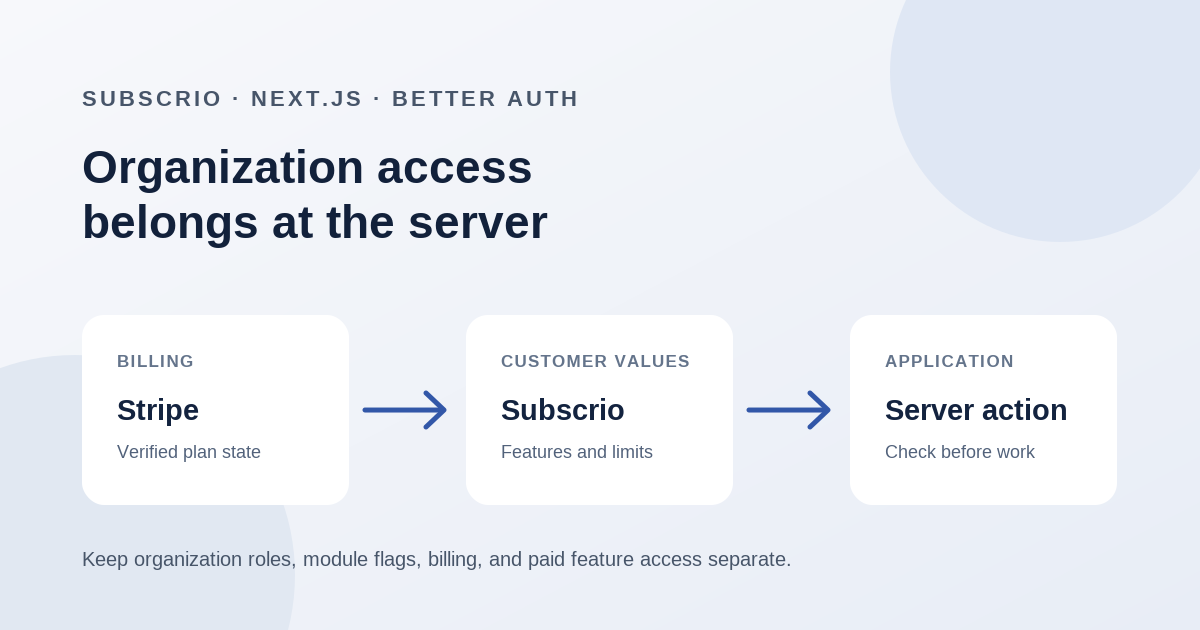
Add customer-specific feature access to the mickasmt Next.js SaaS Starter by connecting its authenticated organization and Stripe subscription to Subscrio. Then check the resolved feature in the server action that accepts the work. Keep the starter’s module flags for deployment choices, Better Auth roles for user permissions, Stripe for billing, and Subscrio for what the customer can use.
The starter already includes Better Auth organizations, Stripe subscriptions, role checks, and modular routes. Those pieces answer different questions. A config/features.ts flag switches a module on for the application build; it does not set a different feature value for each paying organization. A role check says whether a member may act for a workspace; it does not tell you whether that workspace purchased report scheduling.
The code below adds one paid capability to the starter: schedule reports for an organization when its plan includes that feature. The examples show the catalog records, the server-side access check, and the database write that runs only after authorization succeeds. The report table is an application addition; the starter does not include scheduled reports.
Keep each system responsible for one decision
The starter’s lib/auth/session.ts exposes getActiveOrganization(), which resolves the signed-in user, active organization, and membership through Better Auth. Its billing configuration uses organization-scoped Stripe subscriptions. Subscrio can use that verified organization ID as the customer key, so all members of one workspace share the same feature values.
| System | Decision it owns |
|---|---|
| Better Auth | Which user is signed in, which organization is active, and what role the member has |
| Stripe and the Better Auth Stripe plugin | Checkout, payment state, price, and subscription lifecycle |
| Subscrio | The feature values the organization receives from its plan and add-ons |
| Next.js server action or route | Whether the authenticated member may perform this operation for the organization |
The organization ID is the join between billing and product access. Never accept it, a plan name, or a feature value from a browser form. Resolve the active organization on the server for every protected operation.
Create the Subscrio catalog once
Keep the Subscrio client on the server and reuse the starter’s existing PostgreSQL connection. The client module below belongs in lib/subscrio.ts:
import "server-only"
import { Subscrio } from "subscrio"

const connectionString = process.env.DATABASE_URL
if (!connectionString) throw new Error("DATABASE_URL is required")

export const subscrio = new Subscrio({
  database: { connectionString },
})
Run the catalog setup as a one-time script after setting DATABASE_URL. These keys are unique records, so run the script once in a clean development database. In production, use the same calls in your release migration process rather than running them on every application start.
// scripts/setup-subscrio.ts
import { Subscrio } from "subscrio"

const connectionString = process.env.DATABASE_URL
if (!connectionString) throw new Error("DATABASE_URL is required")

const subscrio = new Subscrio({ database: { connectionString } })

try {
  if (await subscrio.verifySchema() === null) {
    await subscrio.installSchema()
  } else {
    await subscrio.migrate()
  }

  await subscrio.features.createFeature({
    key: "scheduled-reports",
    displayName: "Schedule reports",
    valueType: "toggle",
    defaultValue: "false",
  })
  await subscrio.features.createFeature({
    key: "report-limit",
    displayName: "Reports per month",
    valueType: "numeric",
    defaultValue: "0",
  })

  await subscrio.products.createProduct({
    key: "studio-workspace",
    displayName: "Studio workspace",
  })
  await subscrio.products.associateFeature("studio-workspace", "scheduled-reports")
  await subscrio.products.associateFeature("studio-workspace", "report-limit")

  const planValues = [
    { key: "studio-pro", displayName: "Studio Pro", reportLimit: "250" },
    { key: "studio-business", displayName: "Studio Business", reportLimit: "1000" },
  ] as const

  for (const plan of planValues) {
    await subscrio.plans.createPlan({
      key: plan.key,
      productKey: "studio-workspace",
      displayName: plan.displayName,
    })
    await subscrio.plans.setFeatureValue(plan.key, "scheduled-reports", "true")
    await subscrio.plans.setFeatureValue(plan.key, "report-limit", plan.reportLimit)

    await subscrio.billingCycles.createBillingCycle({
      key: `${plan.key}-monthly`,
      planKey: plan.key,
      displayName: "Monthly",
      durationUnit: "months",
      durationValue: 1,
    })
    await subscrio.billingCycles.createBillingCycle({
      key: `${plan.key}-annual`,
      planKey: plan.key,
      displayName: "Annual",
      durationUnit: "months",
      durationValue: 12,
    })
  }
} finally {
  await subscrio.close()
}
Install a TypeScript runner and execute the script once:
pnpm add -D tsx
pnpm exec tsx scripts/setup-subscrio.ts
The application uses the stable keys studio-workspace, studio-pro, studio-pro-monthly, scheduled-reports, and report-limit. A Stripe price ID maps to the billing cycle during subscription synchronization; it does not replace these feature keys.
Map Stripe subscription state to a customer and plan
The starter stores the Better Auth plan name, billing interval, organization reference, period dates, and Stripe subscription ID. The function below maps those fields to one Subscrio customer and one agreement keyed by Stripe’s stable subscription ID. Replace the plan and interval keys with the values configured in your own Better Auth plans and the billing cycles created in Subscrio.
// lib/billing/sync-subscrio.ts
import "server-only"
import { subscrio } from "@/lib/subscrio"

const billingCycleByPlanAndInterval: Record<string, string> = {
  "pro:month": "studio-pro-monthly",
  "pro:year": "studio-pro-annual",
  "business:month": "studio-business-monthly",
  "business:year": "studio-business-annual",
}

function billingCycleFor(plan: string, interval: string | null) {
  const key = `${plan}:${interval ?? "month"}`
  const billingCycleKey = billingCycleByPlanAndInterval[key]
  if (!billingCycleKey) throw new Error(`No Subscrio billing cycle mapped for ${key}`)
  return billingCycleKey
}

type BetterAuthSubscription = {
  referenceId: string
  plan: string
  billingInterval: string | null
  periodStart: Date | null
  periodEnd: Date | null
  trialEnd: Date | null
  cancelAtPeriodEnd: boolean | null
  cancelAt: Date | null
  canceledAt: Date | null
  endedAt: Date | null
}

export async function syncSubscrioSubscription(input: {
  subscription: BetterAuthSubscription
  stripeSubscriptionId: string
  activatedAt: Date
}) {
  const { subscription } = input
  if (!subscription.periodStart || !subscription.periodEnd) {
    throw new Error("Stripe period dates are not ready; retry this sync")
  }
  if (!subscription.billingInterval) {
    throw new Error("Better Auth has no billing interval; retry this sync")
  }

  const customerKey = subscription.referenceId
  if (!(await subscrio.customers.getCustomer(customerKey))) {
    await subscrio.customers.createCustomer({
      key: customerKey,
      displayName: customerKey,
    })
  }

  const key = `stripe_${input.stripeSubscriptionId}`
  const billingCycleKey = billingCycleFor(subscription.plan, subscription.billingInterval)
  const cancellationDate = subscription.cancelAtPeriodEnd
    ? subscription.cancelAt ?? subscription.periodEnd
    : subscription.canceledAt ?? subscription.endedAt
  const update = {
    billingCycleKey,
    currentPeriodStart: subscription.periodStart,
    currentPeriodEnd: subscription.periodEnd,
    ...(cancellationDate ? { cancellationDate } : {}),
    ...(subscription.trialEnd
      ? { trialEndDate: subscription.trialEnd }
      : { clearTrialEndDate: true }),
  }
  const existing = await subscrio.subscriptions.getSubscription(key)

  if (existing) {
    return subscrio.subscriptions.updateSubscription(key, update)
  }

  try {
    return await subscrio.subscriptions.createSubscription({
      key,
      customerKey,
      billingCycleKey,
      stripeSubscriptionId: input.stripeSubscriptionId,
      activationDate: input.activatedAt,
      currentPeriodStart: subscription.periodStart,
      currentPeriodEnd: subscription.periodEnd,
      ...(cancellationDate ? { cancellationDate } : {}),
      ...(subscription.trialEnd ? { trialEndDate: subscription.trialEnd } : {}),
    })
  } catch (error) {
    // A duplicate callback can race the first create. Re-read the stable key
    // and update that record; rethrow if no record was created by the other run.
    const createdByOtherRun = await subscrio.subscriptions.getSubscription(key)
    if (!createdByOtherRun) throw error
    return subscrio.subscriptions.updateSubscription(key, update)
  }
}
Wire the helper to the Better Auth Stripe plugin’s lifecycle callbacks. The organization reference comes from the verified server-side subscription record, not request data.
// lib/auth/server.ts
import { syncSubscrioSubscription } from "@/lib/billing/sync-subscrio"

subscription: {
  enabled: true,
  plans,
  onSubscriptionComplete: async ({ subscription, stripeSubscription }) => {
    await syncSubscrioSubscription({
      subscription,
      stripeSubscriptionId: stripeSubscription.id,
      activatedAt: new Date(stripeSubscription.created * 1000),
    })
  },
  onSubscriptionUpdate: async ({ subscription, stripeSubscription }) => {
    await syncSubscrioSubscription({
      subscription,
      stripeSubscriptionId: stripeSubscription.id,
      activatedAt: new Date(stripeSubscription.created * 1000),
    })
  },
  onSubscriptionCancel: async ({ subscription, stripeSubscription }) => {
    await syncSubscrioSubscription({
      subscription,
      stripeSubscriptionId: stripeSubscription.id,
      activatedAt: new Date(stripeSubscription.created * 1000),
    })
  },
  onSubscriptionDeleted: async ({ subscription, stripeSubscription }) => {
    await syncSubscrioSubscription({
      subscription,
      stripeSubscriptionId: stripeSubscription.id,
      activatedAt: new Date(stripeSubscription.created * 1000),
    })
  },
}
Choose how the application treats payment failures, then map that policy into the subscription dates. The example stores scheduled cancellation as a future cancellation date and immediate cancellation as the event’s cancellation/end date. The Subscrio update API treats omitted dates as unchanged, so this example does not clear an already scheduled cancellation when a customer resumes; handle that reversal explicitly in your billing workflow. The helper also makes repeated callback delivery converge on one agreement, but it does not order two different events delivered out of sequence. If your webhook path can deliver stale events after newer ones, enqueue event IDs durably and have a worker fetch the current billing record before calling this helper. The Stripe plugin remains responsible for payment state. The Subscrio record supplies the customer feature values used by the application.
Check access in the server action
The action must derive the organization from the signed-in session, check the member’s role, check the paid feature, then write the report. The starter provides getActiveOrganization() and isOrganizationManager(). The table below is the small application table used by this example.
// lib/db/schema/scheduled-reports.ts
import { index, pgTable, text, timestamp, uuid } from "drizzle-orm/pg-core"

export const scheduledReports = pgTable("scheduled_report", {
  id: uuid("id").defaultRandom().primaryKey(),
  organizationId: text("organization_id").notNull(),
  createdByUserId: text("created_by_user_id").notNull(),
  title: text("title").notNull(),
  createdAt: timestamp("created_at", { withTimezone: true }).notNull().defaultNow(),
}, (table) => [
  index("scheduled_report_org_created_idx").on(table.organizationId, table.createdAt),
])
Export the table from lib/db/schema/index.ts so the starter’s Drizzle config includes it:
export * from "./scheduled-reports"
Then run pnpm db:generate and pnpm db:migrate.
This server action validates input and keeps the role and subscription checks separate. The organization ID and user ID come from Better Auth, never from submitted form data.
// app/(app)/dashboard/reports/actions.ts
"use server"

import { revalidatePath } from "next/cache"
import { z } from "zod"
import { and, count, eq, gte, lt, sql } from "drizzle-orm"

import { isOrganizationManager } from "@/lib/auth/roles"
import { getActiveOrganization } from "@/lib/auth/session"
import { db } from "@/lib/db"
import { scheduledReports } from "@/lib/db/schema/scheduled-reports"
import { subscrio } from "@/lib/subscrio"

const scheduleReportInput = z.object({
  title: z.string().trim().min(1).max(120),
})

export async function scheduleReport(formData: FormData) {
  const input = scheduleReportInput.safeParse({ title: formData.get("title") })
  if (!input.success) return { ok: false, reason: "invalid_title" as const }

  const { session, organization, member } = await getActiveOrganization()

  if (!isOrganizationManager(member.role)) {
    return { ok: false, reason: "member_permission_required" as const }
  }

  const allowed = await subscrio.featureChecker.isEnabledForCustomer(
    organization.id,
    "studio-workspace",
    "scheduled-reports",
  )
  if (!allowed) return { ok: false, reason: "feature_not_in_plan" as const }

  const reserved = await reserveMonthlyReportSlot(
    organization.id,
    session.user.id,
    input.data.title,
  )
  if (!reserved) return { ok: false, reason: "report_limit_reached" as const }

  revalidatePath("/dashboard/reports")
  return { ok: true as const }
}

async function reserveMonthlyReportSlot(organizationId: string, userId: string, title: string) {
  const limit = await subscrio.featureChecker.getValueForCustomer(
    organizationId,
    "studio-workspace",
    "report-limit",
    0,
  )

  const now = new Date()
  const periodStart = new Date(Date.UTC(now.getUTCFullYear(), now.getUTCMonth(), 1))
  const periodEnd = new Date(Date.UTC(now.getUTCFullYear(), now.getUTCMonth() + 1, 1))
  const lockKey = `${organizationId}:scheduled-reports:${periodStart.toISOString()}`

  return db.transaction(async (tx) => {
    await tx.execute(sql`select pg_advisory_xact_lock(hashtextextended(${lockKey}, 0))`)

    const [usage] = await tx
      .select({ total: count() })
      .from(scheduledReports)
      .where(and(
        eq(scheduledReports.organizationId, organizationId),
        gte(scheduledReports.createdAt, periodStart),
        lt(scheduledReports.createdAt, periodEnd),
      ))

    if (Number(usage?.total ?? 0) >= limit) return false

    await tx.insert(scheduledReports).values({
      organizationId,
      createdByUserId: userId,
      title,
    })
    return true
  })
}
The starter’s module flag remains useful for hiding a route across the whole deployment. It cannot replace the organization feature check above. A free organization is rejected before the database insert; a member without the manager role is rejected even when the organization has the paid feature. getValueForCustomer returns the configured limit, while the transaction lock makes this application’s count-and-insert one operation under concurrent requests. Every code path that consumes the allowance must use the same lock key. This example counts a UTC calendar month; use the customer’s billing-period boundaries when they differ. For billable usage, use Subscrio’s metered-usage workflow instead of treating a database count as billing data.
Verify the important paths
Use a test organization and check the result at the action boundary, not only in the pricing page:
- A Pro organization with a manager can schedule a report.
- A free organization is denied before any report row is written.
- A viewer is denied by the role check even when the organization has the paid feature.
- A customer override can grant or remove a feature for one organization without changing the Stripe price.
- A plan change updates the existing Subscrio agreement rather than creating a second one.
- A retried callback updates the same agreement instead of creating a second one.
- The chosen trial, past-due, and cancellation policy is enforced at its exact boundary.
The organization is the customer key, while the Stripe subscription ID forms the Subscrio subscription key. A support operation can change one workspace’s report allowance without changing the shared plan:
import { OverrideType } from "subscrio"
import { subscrio } from "@/lib/subscrio"

const subscriptionKey = `stripe_${stripeSubscriptionId}`

await subscrio.subscriptions.addFeatureOverride(
  subscriptionKey,
  "report-limit",
  "400",
  OverrideType.Permanent,
)

// Later, remove the exception and let the plan's value apply again.
await subscrio.subscriptions.removeFeatureOverride(subscriptionKey, "report-limit")
This pattern keeps the starter’s authentication, organization roles, module toggles, and Stripe checkout intact. It adds one specific layer: the customer feature values that your application checks before it accepts paid work.