
Use Subscrio for paid access; use flags for rollouts
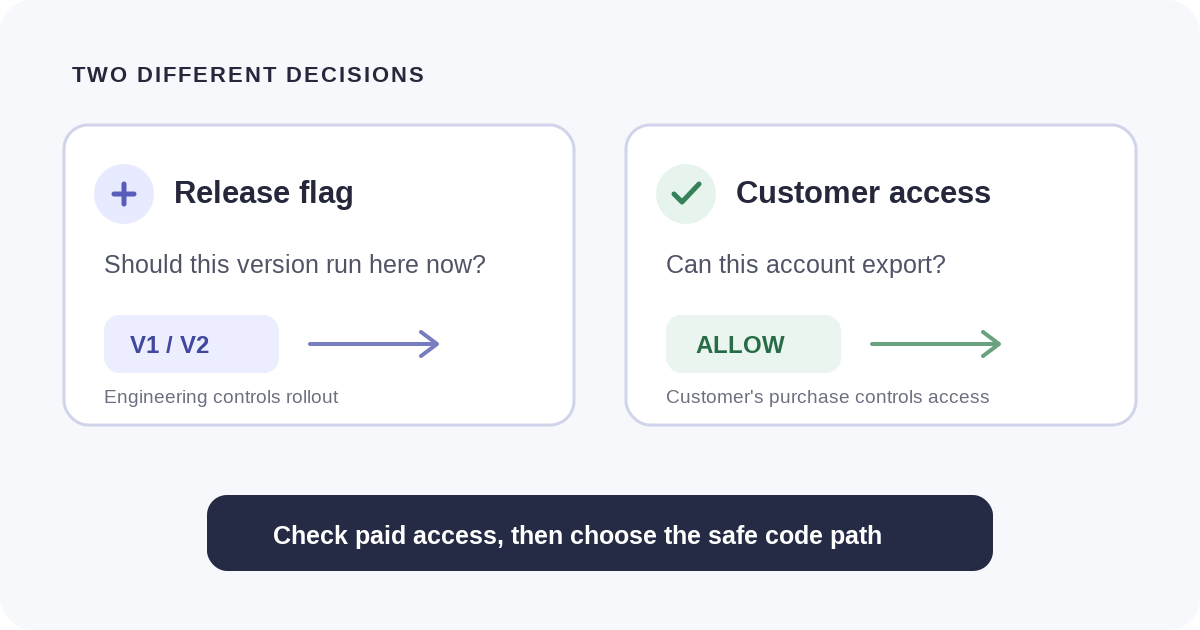
Use Subscrio to resolve whether an authenticated customer can use a paid capability; use a feature flag to decide when a new implementation is ready to roll out. At an endpoint that performs the work, check customer access first, then let the flag choose between safe implementations. A kill switch can return an entitled customer to the stable path without changing the customer’s plan.
Hiding an export button is only a user-interface choice. It does not protect the export route, and a rollout flag does not tell the application whether the account paid for CSV export. The examples below put OpenFeature in a Node.js handler and Microsoft Feature Management in an ASP.NET Core endpoint, with Subscrio checking the customer’s feature access.
Give each decision one job
A release flag controls delivery. It can expose a new implementation to one tenant, a percentage of traffic, or a test environment. When the release is stable, remove the flag and its old code path. A stale flag leaves a permanent branch in the application even though the rollout decision is over.
Paid access answers a durable product question: does this authenticated customer have permission to use this capability now? The answer may come from a plan, an add-on, a one-time purchase, or an explicit customer agreement. It should not change because engineering paused a rollout.
| Decision | Question | Typical owner | What changes it |
|---|---|---|---|
| Release flag | Should this code path run here now? | Engineering | Rollout, incident response, experiment, or environment |
| Paid feature access | Did this customer obtain this capability? | Product policy and billing integration | Purchase, plan change, add-on, or customer agreement |
| Application authorization | May this user act on this customer’s data? | Application security | User role and resource permissions |
These checks can all be needed for one request. They are not substitutes for each other.
Check customer access before selecting a release path
Consider an export endpoint with an existing implementation and a faster replacement. csv-export is the capability the customer buys. csv-export-v2 controls whether the new implementation is ready for their tenant.
The order matters. Check whether the customer can export before choosing which implementation handles the export. If the release flag is off, an entitled customer can use the established implementation. An unentitled customer remains denied even when the new code is enabled for a rollout cohort.
The intended results are:
| Customer access | csv-export-v2 flag | Result |
|---|---|---|
| Allowed | Off | Use the existing export implementation |
| Allowed | On | Use the new export implementation |
| Denied | Off | Deny the export |
| Denied | On | Deny the export |
If there is no safe existing implementation, choose an explicit temporary-unavailable response when the release flag is off. Do not silently turn a rollout decision into a grant of paid access.
Node.js: OpenFeature for rollout, Subscrio for customer access
OpenFeature gives server-side Node.js applications a provider-neutral API for evaluating flags; the provider connects that API to a flag store. Register it during application startup, then retrieve a client. Here, false is the fallback if evaluation cannot supply a value, so the handler stays on the established export path.
import { OpenFeature } from '@openfeature/server-sdk';

const flags = OpenFeature.getClient();

// customerKey must come from the authenticated account, never request input.
export async function exportCsv(customerKey: string) {
  const mayExport = await subscrio.featureChecker.isEnabledForCustomer(
    customerKey,
    'feedbackdesk',
    'csv-export',
  );

  if (!mayExport) {
    return { status: 403, body: { error: 'export_not_included' } };
  }

  const useV2 = await flags.getBooleanValue('csv-export-v2', false);
  const csv = useV2
    ? 'report,format\nmonthly,csv-v2'
    : 'report,format\nmonthly,csv-v1';

  return { status: 200, body: csv, contentType: 'text/csv; charset=utf-8' };
}
The application initializes subscrio on the server and registers its OpenFeature provider at startup. Authentication middleware supplies customerKey from a verified session or tenant membership. Never take that key from a query string, form, or JSON body. The two CSV strings keep the excerpt runnable; replace them with the established and replacement export functions in your application.
The flag only chooses between two implementations. It cannot grant export permission. If the flag provider returns its fallback, an allowed customer receives the established V1 export. If Subscrio cannot resolve the customer’s access, pass the error to the application’s error handler and return a service failure; do not interpret an integration outage as a paid grant.
ASP.NET Core: Microsoft Feature Management for rollout
In .NET, IFeatureManager.IsEnabledAsync evaluates a release flag. Subscrio checks the customer’s feature value separately. The authenticated ClaimsPrincipal supplies the customer key for the access check.
using System.Security.Claims;
using Microsoft.FeatureManagement;
using Subscrio.Core;

app.MapGet("/api/feedback/export", async (
    ClaimsPrincipal user,
    Subscrio.Core.Subscrio subscrio,
    IFeatureManager featureManager) =>
{
    var customerKey = user.FindFirstValue("customer_key");
    if (string.IsNullOrWhiteSpace(customerKey))
        return Results.Unauthorized();

    var mayExport = await subscrio.FeatureChecker.IsEnabledForCustomerAsync(
        customerKey, "feedbackdesk", "csv-export");

    if (!mayExport)
        return Results.Json(
            new { error = "export_not_included" },
            statusCode: StatusCodes.Status403Forbidden);

    var useV2 = await featureManager.IsEnabledAsync("CsvExportV2");
    var csv = useV2
        ? "report,format\nmonthly,csv-v2"
        : "report,format\nmonthly,csv-v1";

    return Results.Text(csv, "text/csv; charset=utf-8");
}).RequireAuthorization();
Register Microsoft Feature Management and configure CsvExportV2 in the flag store. RequireAuthorization runs the endpoint only after authentication. The customer_key claim must come from the signed-in user’s verified account membership. The CSV strings make the code excerpt complete; substitute your existing and replacement export logic. If Subscrio cannot answer the access check, return the application’s service error rather than treating the outage as permission.
The open-source fullstackhero .NET 10 starter uses Microsoft.FeatureManagement to manage simple, tenant-scoped, and percentage-based release flags. Its own documentation distinguishes those switches from a plan’s ActiveFeatureFlags quota, which it says is not enforced against the flag definitions. That is exactly why an application still needs a separate customer access check at the operation that uses the paid feature.
Choose a failure rule for each check
Failure handling follows the job of the check:
- Release flag cannot be evaluated: use the documented fallback. For this example,
falseselects the established implementation while preserving paid access. - Customer access is denied: return the application’s normal forbidden response. A customer can be entitled to other features and still lack this one.
- Customer access service is unavailable: fail closed for this operation and return a service error. Do not assume the customer has access.
- User lacks application permission: deny access to the data even when the customer’s plan includes the export. Plan access does not authorize a user to read another account’s records.
This keeps an engineering decision from changing a customer’s purchase, and it keeps a valid purchase from bypassing application authorization.
Remove release flags when the rollout ends
After the new implementation is stable, delete the flag, its evaluation, and the old branch. Keep the csv-export access check while the product sells that capability. The rollout switch expires with the release; the customer’s access rule does not.
Before changing the catalog, verify both positive and negative cases: an entitled customer can export through either safe implementation, and a customer without export access stays denied even when the rollout flag is on. Also test how the route behaves when the flag provider or access service fails.
Subscrio resolves which features and limits a customer has from the catalog and their current purchases or agreements. Your application still authenticates the user, checks ordinary permissions, selects the release path, and performs the export.
Sources
- OpenFeature Node.js SDK
- Microsoft
IFeatureManagerreference - fullstackhero: Feature flags in .NET 10
- Subscrio TypeScript setup guide
- Subscrio feature checker reference
Authorship
Written by Jasen Fici, founder of Subscrio. Drafted with AI assistance and checked against the linked framework and Subscrio documentation.